The Problem: Suspended Agents and Lost Work
Long-running coding tasks, especially those involving AI agents performing extensive refactors or complex analyses, are notoriously susceptible to interruption. The common culprit? Closing a laptop lid. When a Windows machine's lid is closed, the operating system enters a low-power state, suspending active processes. For developers relying on autonomous coding agents, this can mean hours of work halted mid-task, with no error logs or clear indication of failure. This exact scenario, losing a six-hour agent run to an unexpected suspension, is the direct impetus behind the creation of 'Always Up,' a new free and open-source Windows application designed to solve this specific problem.
The developer behind 'Always Up' experienced this firsthand. An AI agent was deep into a large-scale refactoring operation. After a brief check confirmed progress, the developer closed the laptop lid, assuming the task would complete. Upon returning, the agent's work was incomplete, not due to a crash or error, but because Windows had suspended the system. The agent, caught mid-operation within a tool call, simply ceased functioning without leaving any trace of what went wrong. This lack of discernible failure points makes debugging and recovery impossible, underscoring the need for a solution that keeps processes alive even when the lid is shut.
Introducing 'Always Up': A Lightweight Solution
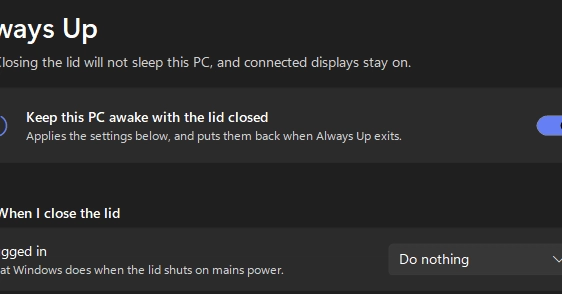
To combat this common developer frustration, a small, dedicated Windows application named 'Always Up' was developed. The core purpose of 'Always Up' is to ensure that long-running jobs, such as those handled by AI coding agents, continue to execute uninterrupted, even when the user closes their laptop lid. The application is designed for simplicity and ease of use, fitting the needs of developers who often juggle multiple demanding tasks.
Key characteristics of 'Always Up' include its free and open-source nature, licensed under the permissive MIT license. This makes it accessible to anyone without cost or restrictive usage terms. Furthermore, the application is remarkably lightweight, distributed as a single 62 KB file. This minimal footprint means no complex installation process; users can simply download and run the executable. Crucially, it has no external dependencies, reducing potential conflicts or compatibility issues on various Windows systems. The entire design philosophy centers around providing a robust solution to a specific problem without introducing unnecessary complexity.
How 'Always Up' Works: Bypassing Windows Sleep
The fundamental challenge lies in how Windows manages power states. Closing the laptop lid typically triggers a system-wide suspension. Standard operating system behavior does not gracefully signal running applications to pause or save their state; instead, it halts execution to conserve power. Attempts to simply prevent the system from sleeping through built-in Windows settings (like power options) often prove insufficient or overly broad, potentially preventing the machine from sleeping when desired and consuming unnecessary power. Scripting solutions that try to keep the system awake can also be complex to manage and may not reliably handle all edge cases, especially when the lid-closure event is the direct trigger.
The 'Always Up' application circumvents this by leveraging specific Windows API calls that inform the system that an application is performing a critical, long-running task. This is distinct from simply preventing the display from turning off or the hard drive from idling. Instead, it signals to the power management subsystem that the system should remain in a fully active state, preventing the suspension of the targeted process. This is achieved through a combination of setting the system's power request level and potentially using more direct methods to keep the CPU and essential services active. The application acts as a persistent guardian for your running processes, ensuring that the OS recognizes the ongoing activity and postpones any sleep or hibernation commands that would otherwise interrupt your agents.
Referenced Sources
- verified