The Problem with Large Log Files
Developers and security professionals routinely face the challenge of sifting through enormous log files. When issues arise, quick access to relevant information is critical. However, many popular log viewing tools, while efficient in many aspects, falter when it comes to reopening large files. The common scenario involves investigating an incident within a 40GB or 50GB log file. After closing the file, even for a brief period, reopening it triggers a lengthy indexing process. This can take minutes, especially on slower storage like USB HDDs, during which the viewer might only display the beginning of the file. This delay directly impacts productivity, forcing users to wait through a repetitive and time-consuming indexing build for every subsequent access.
Popular tools like klogg, while praised for their speed, free and open-source nature, and cross-platform compatibility (Windows, macOS, Linux), are not immune to this specific pain point. Users looking for alternatives are typically not dissatisfied with klogg's general performance but with the friction introduced by this repeated indexing overhead. This is the core problem addressed by a new contender in the log viewing space, aiming to provide near-instantaneous access to even the largest log files without the dreaded re-indexing delay.
Introducing the Alternative: Performance Benchmarks
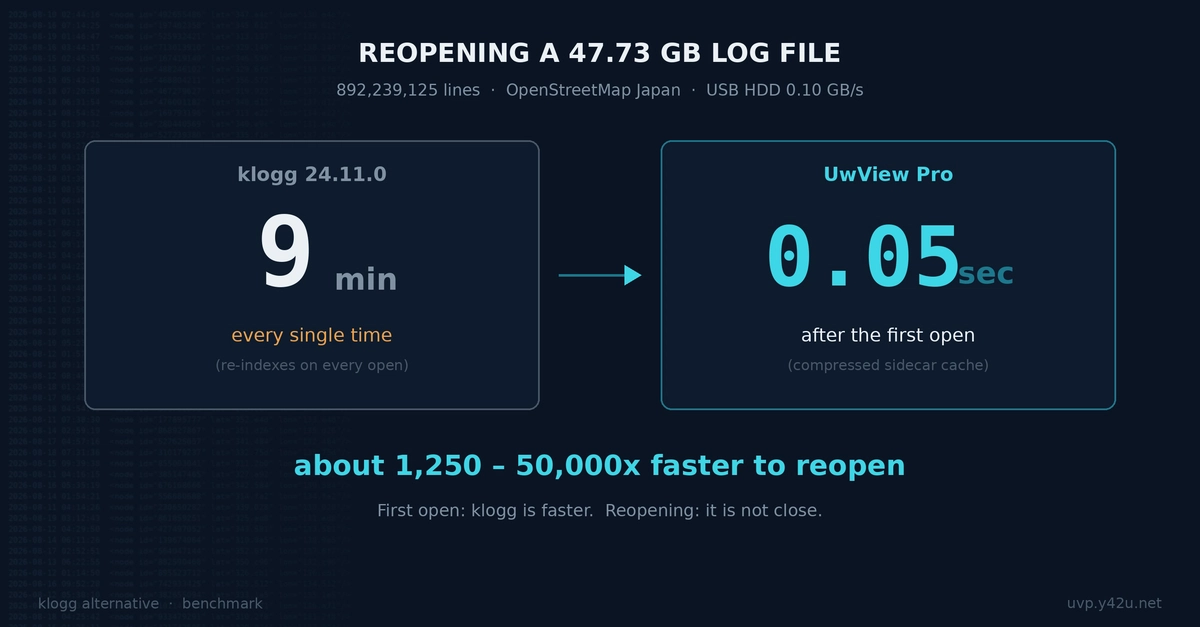
A recent comparison of a new log viewing tool against klogg highlights a significant performance difference, particularly concerning file reopening times. The benchmark was conducted on a substantial 47.73GB log file. While klogg offers a robust viewing experience, its indexing process upon reopening a large file can lead to considerable wait times. On a USB HDD, this wait can extend to nine minutes or more. During this indexing phase, klogg's functionality is limited, often only displaying the initial portion of the file.
The new tool, though not explicitly named in the provided context, demonstrates a remarkable ability to reopen this same 47.73GB file in a mere 0.05 seconds. This represents a staggering improvement over the minutes-long wait associated with traditional indexing methods. This speed suggests a fundamentally different approach to file handling and indexing, one that either avoids the full re-indexing process or employs an exceptionally efficient incremental indexing strategy. The comparison explicitly notes that klogg does win in certain scenarios, implying that for smaller files or initial loads, klogg's performance remains competitive. However, for the specific, high-impact use case of repeatedly accessing very large log files, the new alternative presents a compelling advantage.
Understanding the Technical Approach
The dramatic difference in reopening speed points to a sophisticated technical implementation. Traditional log viewers often build a complete index of the file upon first opening. This index allows for fast searching and filtering. However, when the file is closed and reopened, the tool must either rebuild this index from scratch or, in some cases, use a cached index that might become stale or require verification. The 0.05-second reopening time achieved by the new tool suggests it likely employs one of several advanced strategies:
- In-memory indexing with persistent caching: The tool might load a significant portion of the index into RAM upon initial load and then persist this index to disk in a highly optimized format. Subsequent openings would then load this cached index rapidly, potentially performing only minor updates if the file has changed.
- Zero-copy or memory-mapped file access: Techniques that allow the operating system to map file content directly into a process's address space without explicit copying can drastically reduce I/O overhead. This could enable near-instantaneous access to file metadata and content pointers.
- Incremental indexing with rapid diffing: Instead of rebuilding the entire index, the tool might be designed to quickly identify and index only the new or modified portions of the log file since the last session. This requires efficient file change detection and differential indexing algorithms.
- Pre-computation and background indexing: The tool could potentially pre-compute index structures in the background or on file close, ensuring that the index is always ready for immediate retrieval upon reopening.
Without detailed technical documentation from the new tool, it's difficult to pinpoint the exact mechanism. However, the performance data strongly suggests a departure from conventional full re-indexing paradigms. The ability to handle a 47.73GB file and reopen it in milliseconds is not merely an incremental improvement; it represents a fundamental shift in how large log files can be managed and accessed interactively.
Broader Implications for Developers and Ops
The implications of a log viewer that can instantly access massive log files are significant for any professional working with system logs. For developers debugging complex applications, rapid access means less time spent waiting and more time spent analyzing. For SREs and operations teams managing large-scale infrastructure, the ability to quickly pivot between different log files or re-examine specific events without delay can be crucial during incident response. This speed directly translates to reduced Mean Time To Resolution (MTTR).
Security analysts, often tasked with forensic investigations, can benefit immensely from tools that don't hinder their workflow. The ability to quickly open and search through terabytes of historical log data, even across multiple files, without lengthy indexing delays, could be a game-changer. This efficiency can make the difference between identifying a threat quickly or missing a critical window.
Furthermore, the existence of such a tool challenges the status quo for existing log management solutions. While enterprise-grade solutions often offer sophisticated indexing and search capabilities, they typically come with significant infrastructure and cost overhead. A performant, potentially free or low-cost desktop tool that can handle massive files locally addresses a common pain point without requiring a full SIEM deployment. This could democratize access to powerful log analysis capabilities for smaller teams or individual developers.
The Unanswered Question of Scalability
While the benchmark demonstrates impressive performance on a 50GB file, the critical question that remains unanswered is how this tool scales beyond that. Log files in large enterprises can easily reach hundreds of gigabytes, or even terabytes. Understanding the tool's performance characteristics as file sizes increase, its memory footprint, and its behavior with multiple concurrent large file accesses will be crucial for its adoption in demanding environments. Additionally, the comparison is based on a single hardware configuration (USB HDD). Performance on NVMe SSDs or even faster network storage could reveal different bottlenecks or further highlight the tool's strengths. The true measure of its utility will lie in its sustained performance and stability across a wide range of file sizes and hardware configurations.