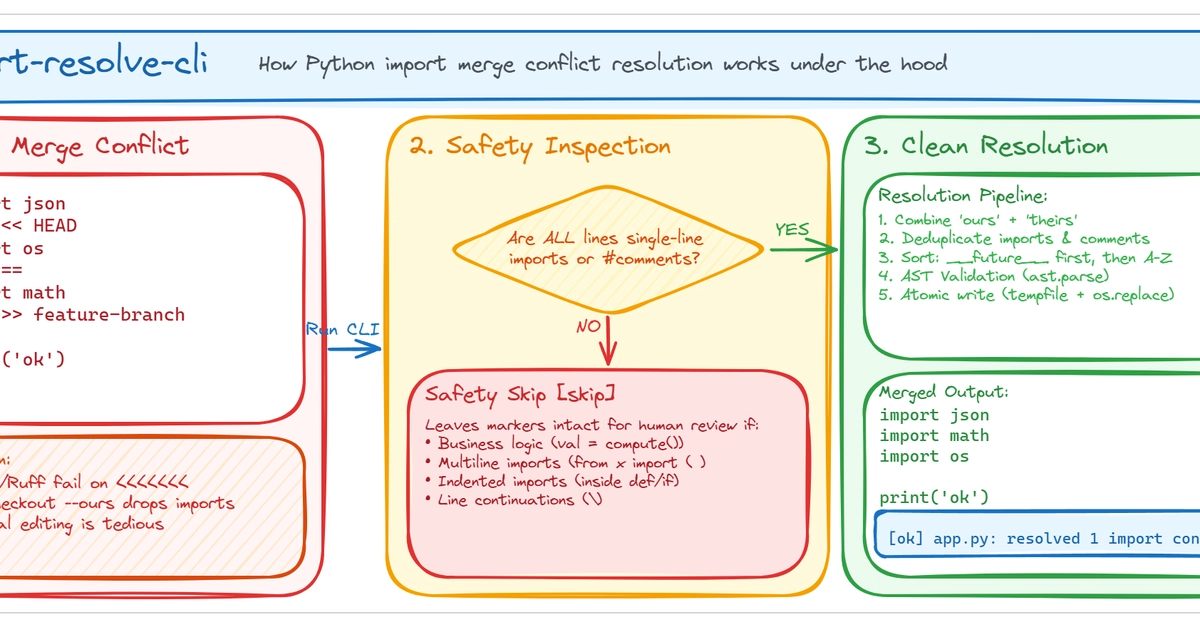
The Common Python Import Conflict
Many developers encounter minor but time-consuming annoyances with Git. One such recurring issue, frequently discussed on Reddit, involves merge conflicts specifically within import statements at the top of Python files. This isn't about complex code merging, but rather the tedious manual resolution of conflicts when two developers add different import lines to the same file.
Imagine one developer adds import os to a Python file, while another adds import math. Both changes occur in the same section of the file, but Git flags it as a conflict. The common workflow then requires manually opening the file, identifying the conflict markers (<<<<<<< HEAD, =======, >>>>>>> branch-name), and carefully deleting them to retain both import statements. This process, while straightforward, adds unnecessary friction to the development workflow.
To address this specific pain point, a developer created a small Command Line Interface (CLI) tool. The goal is simple: automate the resolution of these import-related merge conflicts, allowing developers to accept both changes without manual intervention.
Existing Solutions and Their Limitations
Before developing a new tool, it's essential to understand how such issues are typically handled. GitHub's official documentation, for instance, guides users through resolving merge conflicts manually. This involves:
- Identifying the conflicted file in your Git repository.
- Opening the file in a text editor.
- Locating the conflict markers.
- Editing the code to include the desired changes, removing the markers and any extraneous text.
- Staging the resolved file.
- Committing the merge.
While effective for general merge conflicts, this manual process is overkill for the simple case of adding distinct import lines. It requires context switching and careful manual editing, which can be error-prone and time-consuming, especially when dealing with many small conflicts.
Other approaches might involve using more sophisticated merge tools, but these often require specific configuration and can still present a complex interface for a simple problem. The core issue remains that Git's default conflict resolution mechanism treats these import additions as potentially destructive, when in most Python projects, adding distinct imports is a safe and desired outcome.
The New CLI Tool: Design and Functionality
The newly developed CLI tool aims to streamline this process by specifically targeting Python import conflicts. The core idea is to detect these types of conflicts and automatically resolve them, preserving all intended import statements.
The tool operates by parsing the conflicted file. It looks for the standard Git conflict markers. Within the sections marked as conflicts, it specifically analyzes lines that appear to be import statements (e.g., lines starting with import or from ... import). If it identifies distinct import statements from different branches within the same conflict block, it intelligently merges them. This means if one branch added import os and another added import math, the tool ensures the final file contains both import os and import math, effectively removing the conflict markers without losing any intended imports.
The developer's initial thought process, visualized in a sketch, involved a simple flow: conflict in → one command → clean imports out. This reflects the tool's intended user experience: a single command that resolves the specific conflict type, leaving the developer's working directory clean and ready for the next step.
How to Use the Tool
While the specifics of installation and usage depend on the tool's packaging (e.g., PyPI, direct script execution), the general workflow would look something like this:
- Ensure the project has a Git merge conflict, specifically involving Python import statements.
- Run the CLI tool, likely specifying the conflicted file or letting it operate on the current working directory. For example, a command might be
git-import-resolveror simplygit-import-resolverif run within the conflicted repository. - The tool processes the file, automatically resolving import conflicts.
- Developers can then review the changes (though for this specific conflict type, the changes should be predictable and safe) and proceed with staging and committing the merge.
This approach significantly reduces the manual effort required for a common, albeit minor, Git annoyance. It allows developers to focus on more critical aspects of their code rather than repetitive conflict marker cleanup.
Broader Implications and Future Development
The existence of such a tool highlights a broader trend in developer tooling: the creation of highly specialized utilities to solve niche pain points. While Git itself is powerful, its generic conflict resolution can sometimes be inefficient for specific file types or common coding patterns. Tools like this one demonstrate how custom solutions can enhance developer productivity by understanding and automating domain-specific resolutions.
What remains to be seen is the adoption rate of such a specific tool. Will it become a standard part of developer workflows, or will it remain a niche solution for those who frequently encounter this particular import conflict scenario? Furthermore, the tool's success could inspire similar utilities for other common, yet specific, merge conflict types across different programming languages and file formats. The potential exists to build a suite of intelligent conflict resolvers that integrate seamlessly with Git, making the merging process even smoother.
For developers working with Python, especially in collaborative environments where frequent merges occur, this CLI offers a tangible improvement. It turns a manual, potentially frustrating task into an automated one, saving valuable time and reducing the cognitive load associated with resolving seemingly trivial conflicts.