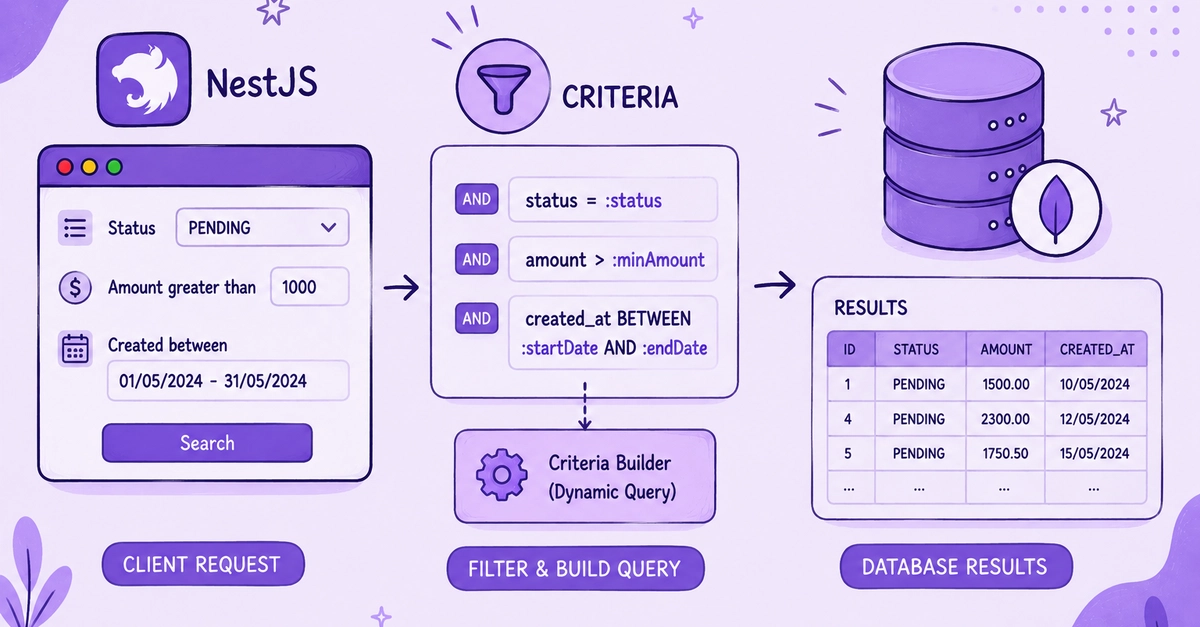
The Limits of Rigid Signatures
In modern web development, especially with frameworks like NestJS, we often encounter scenarios where client applications need to fetch data with varying criteria. Traditional approaches typically involve defining specific API endpoints with fixed parameters, leading to a proliferation of endpoints for slightly different queries. This rigidity becomes cumbersome, especially when dealing with complex filtering, sorting, and pagination requirements. A common example is a library catalog, where users might want to search for books by title, author, publication year, genre, or a combination thereof, with options to sort by title or year, and paginate results.
Consider the standard NestJS controller method for fetching books:
@Get()
async findBooks(
  @Query('title') title?: string,
  @Query('author') author?: string,
  @Query('year') year?: number,
  @Query('genre') genre?: string,
  @Query('sortBy') sortBy?: 'title' | 'year',
  @Query('sortOrder') sortOrder?: 'asc' | 'desc',
  @Query('page') page?: number,
  @Query('limit') limit?: number
): Promise<Book[]> {
  // ... complex logic to build query based on these params
}
This approach quickly becomes unwieldy. Each new filtering or sorting option requires modifying the controller method signature, potentially breaking existing clients. Furthermore, the logic within the method to dynamically construct a query based on these optional parameters can become deeply nested and hard to maintain. The server is dictating the shape of the request, forcing the client to conform to a predefined structure.
Introducing the Criteria Pattern
The Criteria pattern offers a more flexible and scalable solution by shifting the paradigm: instead of the client asking for a specific method signature, the client asks for a file of criteria. This file encapsulates all the necessary conditions for a data query. The server then interprets this file to construct and execute the appropriate query. This decouples the client's request from the server's implementation details, allowing for greater flexibility and extensibility.
In the context of NestJS, this translates to defining a structure that represents the client's request, which can be passed as a single argument to a service method. This structure, often a class decorated with NestJS decorators, acts as the “file” of criteria.
Let's refactor the book fetching example using a Criteria class. We can define a BookCriteria class that holds all possible query parameters. This class can utilize NestJS's validation pipes and decorators to ensure the incoming data is structured correctly.
// src/book/dto/book-criteria.dto.ts
import { IsOptional, IsString, IsInt, Min, Max, IsEnum } from 'class-validator';
import { Type } from 'class-transformer';

export enum SortByOptions {
  TITLE = 'title',
  YEAR = 'year',
}

export enum SortOrderOptions {
  ASC = 'asc',
  DESC = 'desc',
}

export class BookCriteria {
  @IsOptional()
  @IsString()
  title?: string;

  @IsOptional()
  @IsString()
  author?: string;

  @IsOptional()
  @Type(() => Number)
  @IsInt()
  @Min(1900)
  @Max(new Date().getFullYear())
  year?: number;

  @IsOptional()
  @IsString()
  genre?: string;

  @IsOptional()
  @IsEnum(SortByOptions)
  sortBy?: SortByOptions;

  @IsOptional()
  @IsEnum(SortOrderOptions)
  sortOrder?: SortOrderOptions;

  @IsOptional()
  @Type(() => Number)
  @IsInt()
  @Min(1)
  page?: number;

  @IsOptional()
  @Type(() => Number)
  @IsInt()
  @Min(1)
  @Max(100)
  limit?: number;
}
Now, the controller method simplifies significantly:
// src/book/book.controller.ts
import { Controller, Get, Query, ParseIntPipe, DefaultValuePipe } from '@nestjs/common';
import { BookService } from './book.service';
import { BookCriteria } from './dto/book-criteria.dto';

@Controller('books')
export class BookController {
  constructor(private readonly bookService: BookService) {}

  @Get()
  async findBooks(@Query() criteria: BookCriteria) {
    return this.bookService.findBooksWithCriteria(criteria);
  }
}
The BookCriteria DTO, when used with NestJS's built-in validation pipes (enabled globally or on a per-route basis), automatically handles parsing and validating the incoming query parameters. The entire set of client-requested conditions is passed as a single object to the service layer.
The Service Layer's Role
The service layer then becomes responsible for interpreting this `BookCriteria` object and translating it into a concrete database query. This keeps the controller clean and focused on request handling, while the service handles the business logic and data access. The translation can be done using an Object-Relational Mapper (ORM) like Mongoose (for MongoDB) or TypeORM, which often provide mechanisms to build queries dynamically from object properties.
// src/book/book.service.ts
import { Injectable } from '@nestjs/common';
import { InjectModel } from '@nestjs/mongoose';
import { Model } from 'mongoose';
import { Book, BookDocument } from './book.schema';
import { BookCriteria } from './dto/book-criteria.dto';

@Injectable()
export class BookService {
  constructor(@InjectModel(Book.name) private bookModel: Model<BookDocument>) {}

  async findBooksWithCriteria(criteria: BookCriteria): Promise<Book[]> {
    const query: any = {};

    if (criteria.title) {
      query.title = { $regex: criteria.title, $options: 'i' }; // Case-insensitive search
    }
    if (criteria.author) {
      query.author = { $regex: criteria.author, $options: 'i' };
    }
    if (criteria.year) {
      query.year = criteria.year;
    }
    if (criteria.genre) {
      query.genre = criteria.genre;
    }

    const sortOptions: any = {};
    if (criteria.sortBy && criteria.sortOrder) {
      sortOptions[criteria.sortBy] = criteria.sortOrder === 'asc' ? 1 : -1;
    }

    const page = criteria.page || 1;
    const limit = criteria.limit || 10;
    const skip = (page - 1) * limit;

    const books = await this.bookModel.find(query)
      .sort(sortOptions)
      .skip(skip)
      .limit(limit)
      .exec();

    return books;
  }
}
This separation of concerns makes the system more maintainable. If the database schema changes or if we switch to a different database, the modifications are primarily confined to the service layer. The controller and the client's request structure can remain largely unaffected.
Benefits and Considerations
The Criteria pattern offers several advantages:
- Flexibility: Clients can request data with any valid combination of criteria without needing new API endpoints.
- Maintainability: Reduces the number of controller methods and simplifies their signatures. Logic is centralized in the service.
- Scalability: Easier to add new filtering or sorting options by simply extending the criteria DTO and the service logic.
- Type Safety: Using DTOs with decorators provides compile-time and runtime validation, catching errors early.
However, it's important to consider potential downsides. If the criteria object becomes excessively large with hundreds of optional fields, it might indicate a need to rethink the data model or query strategy. Also, while this pattern centralizes query building in the service, complex query construction can still become a significant piece of logic. For extremely complex scenarios, one might consider a dedicated query builder library or a more sophisticated DSL (Domain Specific Language) approach within the service layer.
The concept of asking for a