The Unseen Foundation: Why Design Docs Matter
A software design document (SDD) is more than just a formality; it's the blueprint for a successful project. In a field often characterized by rapid iteration and evolving requirements, a well-crafted design document serves as a critical anchor. It ensures that everyone involved—developers, product managers, QA, and even future maintainers—understands the 'what,' 'why,' and 'how' of a proposed system or feature. Without one, projects drift. Ambiguity festers. Misunderstandings lead to costly rework. Think of it less like a rigid contract and more like a shared whiteboard session captured for posterity, ensuring everyone is drawing from the same sketchpad.
The primary goal of an SDD is to achieve consensus and clarity. It forces the author to think through the problem space, explore alternatives, and articulate a coherent solution before significant development effort is invested. This upfront investment pays dividends by minimizing scope creep, identifying potential pitfalls early, and providing a clear roadmap for implementation.
Deconstructing the Effective Design Document
While specific templates vary, a truly effective software design document typically includes several core components:
1. Goals and Non-Goals
This is where you define the problem you are solving and the desired outcomes. What is the system intended to achieve? What specific metrics will indicate success? Equally important are the non-goals. What is explicitly out of scope for this iteration or project? Clearly stating non-goals prevents scope creep and manages expectations. For instance, if you're designing a new authentication service, a goal might be 'secure user login via email/password and OAuth 2.0,' while a non-goal might be 'support for multi-factor authentication in this phase.'
2. Background and Motivation
Why are we building this? What problem does it solve for users, the business, or the engineering team? This section provides context, explaining the user pain points, business needs, or technical debt that necessitates this solution. Understanding the 'why' helps engineers make better trade-offs during implementation and provides a shared rationale for the project.
3. Proposed Solution
This is the heart of the document. It details the technical approach. Break it down into logical sub-sections:
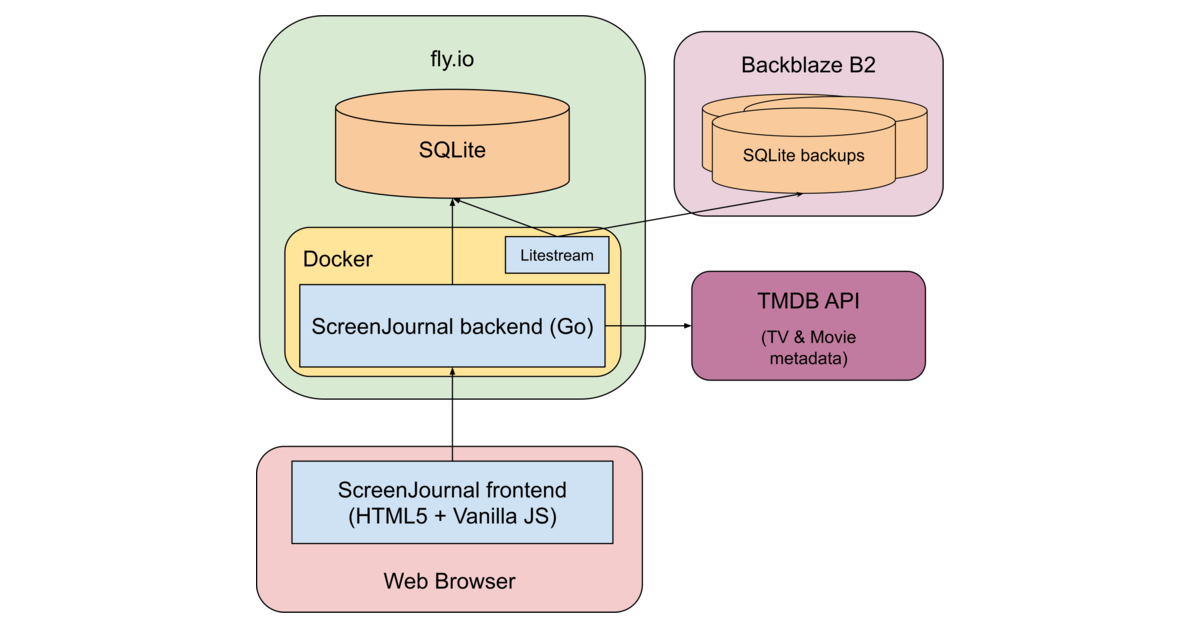
- Architecture: Describe the high-level system design. What are the main components? How do they interact? Use diagrams to illustrate the relationships.
- Data Model: If applicable, outline the data structures, schemas, and relationships. How will data be stored, accessed, and managed?
- APIs and Interfaces: Define the contracts between different services or components. Specify request/response formats, error codes, and authentication mechanisms.
- User Interface (if applicable): Describe key user flows and interactions. Wireframes or mockups can be invaluable here.
- Security Considerations: Address potential security vulnerabilities and how the design mitigates them.
- Scalability and Performance: How will the system handle increased load? What are the performance targets?
When presenting the solution, don't just describe what you've chosen. Explain *why* you chose it. What alternatives did you consider, and what were the trade-offs? This demonstrates thoroughness and helps reviewers understand the rationale behind critical decisions.
4. Alternatives Considered
No solution exists in a vacuum. This section is crucial for demonstrating due diligence. Detail other approaches you evaluated, their pros and cons, and why they were ultimately rejected in favor of the proposed solution. This not only strengthens your chosen approach but also educates reviewers and stakeholders about the complexities involved.
5. Open Questions
Even the most thorough design document will have unanswered questions. Listing them explicitly invites discussion and ensures that these items aren't overlooked. This section should be a call for input, not a confession of inadequacy. It’s a proactive way to solicit feedback on critical unknowns.
6. Future Work and Considerations
What are the next steps beyond the initial implementation? What features or improvements might be considered in later phases? This helps frame the current work within a larger product vision and sets expectations for future development.
7. Rollout Plan
How will the new system or feature be deployed? Describe the deployment strategy, including any phased rollouts, feature flags, rollback procedures, and monitoring plans. A clear rollout plan minimizes disruption and ensures a smooth transition.
The Review and Iteration Cycle
A design document is not meant to be written in isolation. It thrives on feedback. Once drafted, circulate it among relevant stakeholders—engineers, architects, product managers, and operations. Encourage constructive criticism. Schedule review meetings to discuss the document, clarify points, and address concerns. Be prepared to iterate. The review process is where the document truly gains its strength, as diverse perspectives identify blind spots and refine the proposed solution. The surprising detail here is often how much a seemingly small question from a reviewer can uncover a significant flaw in the initial design.
Keeping Design Docs Alive
A design document should be a living artifact, updated as the system evolves. While the initial design document captures the plan, subsequent updates can reflect significant architectural changes or shifts in requirements. This ensures the document remains a valuable reference point throughout the project lifecycle, not just an artifact from its inception.
Writing effective software design documents is a skill that improves with practice. By focusing on clarity, consensus, and thoroughness, you can create documents that not only guide development but also foster a shared understanding and a more robust, well-aligned project outcome.