The Core Problem: Why Generic Prompts Fail
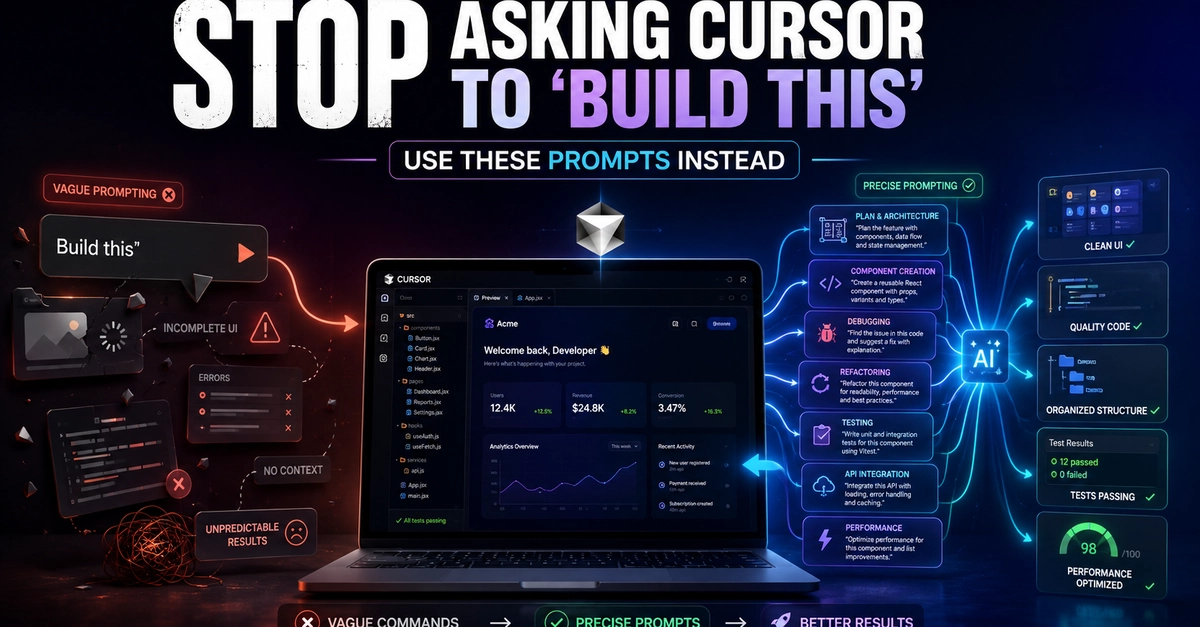
Many developers treat AI coding assistants like Cursor with a common, yet flawed, approach: vague instructions. Typing “build this feature” or “create a login screen” into Cursor, for instance, is akin to handing a junior developer a half-baked idea with no context, no constraints, and no examples. This lack of specificity leads to predictable, frustrating outcomes: broken imports, inconsistent architecture, and code that requires substantial manual rewriting. Cursor, like other advanced AI coding tools, can generate impressive snippets, but without precise guidance, it often guesses the developer’s intent, resulting in functional but not production-ready code.
The AI has no insight into your project's existing structure, preferred libraries, coding standards, or the specific business logic required. It doesn't know your database schema, your authentication strategy, or your desired UI/UX patterns. Therefore, when asked to “build this,” it defaults to the most common or simplest implementation it has seen in its training data, which rarely aligns with the nuances of a specific, live project. This isn't a failing of the AI’s intelligence, but a direct consequence of insufficient input. The result is code that might compile and run, but fails critical tests for maintainability, scalability, and security.
A Repeatable Framework for Effective Prompting
To transform Cursor from a guessing machine into a reliable coding partner, a structured prompting framework is essential. This approach moves beyond simple commands to provide the AI with the necessary context and constraints to generate high-quality code. The framework can be broken down into several key components:
1. Define the Goal and Scope
Clearly articulate what you want the AI to achieve. Instead of “build a login screen,” be specific: “Implement a user login screen for a web application using React and Tailwind CSS.” Specify the desired outcome, such as user authentication, data persistence, or UI rendering.
2. Provide Context
This is the most critical part. The AI needs to understand your project's environment. Include:
- Technology Stack: List the primary languages, frameworks, and libraries (e.g., Python/Django, Node.js/Express, Flutter, Swift/UIKit).
- Existing Architecture: Briefly describe relevant parts of your current project structure. For example, “This component will be part of a microservices architecture, communicating via REST APIs,” or “The data will be stored in a PostgreSQL database managed by an ORM like SQLAlchemy.”
- Dependencies: Mention any specific libraries or packages that must be used or avoided.
- Coding Standards: If your team follows specific style guides or patterns (e.g., SOLID principles, specific naming conventions), mention them.
3. Specify Constraints and Requirements
Detail the non-functional requirements and any limitations:
- Performance: “The API endpoint should handle 100 requests per second with sub-200ms latency.”
- Security: “Ensure all user inputs are sanitized against XSS attacks,” or “Implement JWT-based authentication with refresh tokens.”
- Error Handling: “Include robust error handling with meaningful messages and log critical failures.”
- UI/UX: “The form should have validation feedback in real-time,” or “Follow the provided Material Design guidelines.”
4. Include Examples
Provide concrete examples of input and expected output. This is incredibly powerful for AI models.
- Input Example: If you're asking for a data processing function, show it a sample input JSON or CSV row.
- Output Example: Show the AI exactly what the transformed data or generated structure should look like.
- Code Snippets: If you have existing code that the new feature should integrate with or mimic in style, include relevant snippets.
5. Define the Deliverable
Specify the format of the AI's output. Do you need a full component, a function, a class, a configuration file, or a set of unit tests? Be explicit about what constitutes the “done” state for the AI’s task.
Real-World Examples: Flutter and Laravel
Let's illustrate this framework with practical examples. Imagine you need to add a feature to a Flutter app and a Laravel backend.
Flutter Example: Implementing a Search Functionality
Vague Prompt: “Add search to my app.”
Structured Prompt:
Goal: Implement a search bar and results display for the product catalog in my Flutter app.
Context:
- Technology: Flutter, Dart, Provider for state management.
- Architecture: The app uses a BLoC pattern for business logic. Data is fetched from a REST API endpoint
/api/products/search?q={query}which returns a JSON array of product objects. Each product object hasid,name,price, andimageUrl.- Existing Code: The
ProductCard.dartwidget displays individual product details.Requirements:
- The search bar should be in the AppBar.
- As the user types (after 300ms debounce), the app should query the API.
- Display a loading indicator while fetching.
- Show a list of
ProductCardwidgets for matching products.- If no results, display a “No products found” message.
- Handle API errors gracefully with a user-friendly message.
Deliverable: Generate the complete Dart code for a new
ProductSearchScreen.dartwidget, including state management logic using Provider, and integrate it into the existingmain.dartnavigation.
Laravel Example: Creating an API Endpoint for User Profiles
Vague Prompt: “Make a user profile API.”
Structured Prompt:
Goal: Create a new RESTful API endpoint in Laravel to retrieve a user's profile information.
Context:
- Technology: Laravel 10, PHP 8.2, Eloquent ORM.
- Database: A
userstable with columnsid,name,avatar_url, andbio. Aprofilestable withuser_id,location, andwebsite.- Authentication: The endpoint should be protected by Laravel Sanctum API tokens.
Requirements:
- The endpoint should be a GET request to
/api/v1/users/{user_id}/profile.- It should return a JSON object containing the user's name, email, avatar_url, bio, location, and website.
- If the user or their profile does not exist, return a 404 Not Found response.
- Ensure proper sanitization of all returned data to prevent injection attacks.
- The endpoint should be added to the
routes/api.phpfile.Deliverable: Generate the necessary controller method, route definition, and any required Eloquent model relationships (assuming
User.phpmodel exists with ahasOnerelationship to aProfile.phpmodel). Provide example JSON response for a successful request.
Turning AI into a True Partner
By adopting this detailed, context-rich prompting methodology, developers can significantly improve the quality and relevance of code generated by AI assistants like Cursor. This isn't about asking the AI to think for you; it's about providing it with the precise instructions and context it needs to execute your vision efficiently. Treat the AI as a highly capable but context-blind junior developer. The more information you provide upfront, the less time you'll spend debugging and refactoring later. This structured approach moves AI coding tools from being novelties to indispensable components of a productive development workflow.