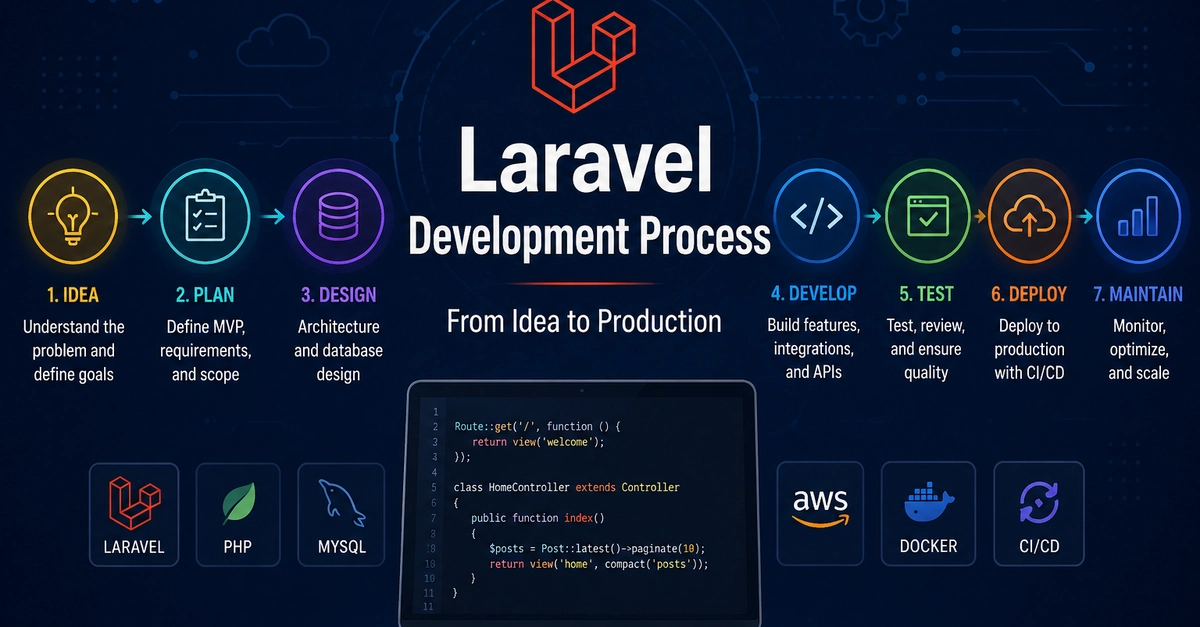
1. Start With the Business Problem
Building a successful web application with Laravel extends far beyond writing code. It begins with a clear understanding of the business problem the application aims to solve. Before diving into technical details like controllers, models, databases, or cloud infrastructure, the foundational step is to define the application's core purpose and objectives. This stage is about translating a business need into actionable requirements.
A project might originate from a simple request such as, "We need a customer portal." This initial statement, while brief, is the seed from which the entire project will grow. It necessitates further exploration to uncover the specific functionalities, user interactions, and data management required to make this portal effective. Without a solid grasp of the business problem, development efforts can easily become misdirected, leading to an application that fails to meet user needs or deliver business value.
This initial phase involves collaboration with stakeholders to flesh out the requirements. What specific tasks should the customer portal enable users to perform? What information needs to be displayed? What are the security considerations? Answering these questions early on prevents costly rework later in the development cycle. It is akin to an architect understanding the client's lifestyle and needs before sketching a single blueprint; the foundation of the building is the understanding of its purpose.
2. Plan the Application Architecture
Once the business problem is well-defined, the next crucial step is architectural planning. This involves designing the structure of the application, selecting the appropriate technologies, and outlining the development roadmap. For a Laravel application, this means deciding on the project's scope, identifying key features, and determining how different components will interact.
A well-structured plan considers aspects such as database design, API integrations, user authentication, and frontend architecture. For instance, if the customer portal needs to integrate with an existing CRM, the architectural plan must detail how this integration will be implemented, what data will be exchanged, and how potential conflicts will be managed. This phase also involves choosing the right tools and packages that complement Laravel's core features, such as state management libraries for the frontend or specific authentication solutions.
The architectural plan should also anticipate future scalability and maintainability. How will the application handle an increasing number of users or data? What strategies will be employed to ensure the codebase remains organized and easy to update as new features are added or existing ones modified? A proactive approach to architecture, like building a strong skeleton for a body, ensures the application can grow and adapt without collapsing under its own weight.

3. Develop the Application
With a solid plan in place, development can begin. This is where the bulk of the coding happens, transforming the design into a functional application. Laravel's elegant syntax and extensive features facilitate rapid development, but disciplined coding practices are essential for building a robust and maintainable product.
Key development activities include:
- Setting up the development environment: Ensuring all developers have a consistent and functional environment, often using tools like Docker or Homestead.
- Database schema design and migration: Creating and managing the database structure using Laravel's migration system.
- Building controllers and routes: Defining the application's logic and how requests are handled.
- Developing models and Eloquent relationships: Interacting with the database to manage data.
- Creating views and frontend components: Designing the user interface and user experience.
- Implementing authentication and authorization: Securing user access and permissions.
- Writing unit and feature tests: Ensuring code quality and application stability.
Throughout the development process, continuous integration and continuous delivery (CI/CD) pipelines should be considered. Automating testing and deployment reduces manual errors and speeds up the release cycle. This phase is iterative; feedback from early testing and stakeholder reviews should inform subsequent development sprints. Think of this stage as constructing the building, brick by brick, ensuring each piece fits perfectly according to the architect's plan.
4. Testing and Quality Assurance
Before any application can be considered ready for production, it must undergo rigorous testing. Quality Assurance (QA) is not an afterthought but an integral part of the development lifecycle. This stage aims to identify and fix bugs, ensure the application meets all specified requirements, and verify its performance and security.
Laravel's built-in testing tools, such as PHPUnit for unit and feature testing, are invaluable here. Comprehensive test coverage provides confidence that changes do not introduce regressions. Beyond automated tests, manual testing by QA professionals is critical for evaluating the user experience, edge cases, and complex workflows that might be missed by automated scripts.
Performance testing is also vital. Will the application handle the expected load? Are there bottlenecks in the code or database queries that need optimization? Security testing, including penetration testing and vulnerability scanning, is non-negotiable to protect user data and the application itself. A thorough QA process is like inspecting the building at various stages of construction to ensure structural integrity, safety, and adherence to code, guaranteeing it's fit for occupancy.
5. Deployment to Production
Deploying a Laravel application to a live production environment requires careful planning and execution. The goal is to make the application accessible to end-users smoothly and reliably, minimizing downtime and potential issues.
Several strategies and tools can be employed for deployment. Common approaches include using SSH to connect to a server and manually deploying code, utilizing deployment scripts, or leveraging managed hosting services that automate much of the process. Tools like Envoyer, Forge, or CI/CD platforms (e.g., GitHub Actions, GitLab CI, Jenkins) are frequently used to streamline deployments.
Key considerations during deployment include:
- Environment configuration: Managing different configurations for development, staging, and production environments using `.env` files.
- Database migrations: Applying database schema changes to the production database.
- Asset compilation: Building frontend assets (CSS, JavaScript) for production.
- Cache clearing: Ensuring the application uses the latest configurations and code.
- Zero-downtime deployment: Implementing strategies to update the application without interrupting user access.
A successful deployment is akin to the final inspection and handover of a building; it signifies that the structure is complete, safe, and ready for its intended occupants. It requires meticulous attention to detail to ensure a seamless transition from development to live operation.
6. Monitoring and Maintenance
The development process does not end with deployment. Once the application is live, continuous monitoring and maintenance are essential for ensuring its ongoing health, performance, and security. This phase is about keeping the application running optimally and adapting to evolving user needs and business requirements.
Monitoring involves tracking key metrics such as application uptime, response times, error rates, and server resource utilization. Tools like Sentry, New Relic, or Laravel's own Telescope can provide invaluable insights into application performance and potential issues. Setting up alerts for critical errors or performance degradation allows development teams to proactively address problems before they significantly impact users.
Maintenance includes regular updates to Laravel itself and its dependencies to benefit from new features, performance improvements, and security patches. Bug fixes, performance optimizations, and the addition of new features based on user feedback or changing business goals are also part of ongoing maintenance. This lifecycle stage is like the ongoing upkeep of a building – regular inspections, minor repairs, and renovations to ensure it remains functional, safe, and relevant over time. A well-maintained application, like a well-kept building, provides long-term value and reliability.
The entire process, from understanding the business problem to continuous monitoring, emphasizes that building a successful Laravel application is a holistic endeavor. It requires a blend of technical expertise, strategic planning, rigorous quality assurance, and ongoing commitment to maintenance and improvement.