The Genesis of Kintara: A Hobbyist's Solution
The story of Kintara, a self-hosted document library and reader, begins not with a market gap identified by a team of strategists, but with a developer's personal struggle: an overabundance of hobbies. As the creator, who prefers to remain unnamed publicly beyond their online handle, found their digital life cluttered with disparate documents across various formats, the need for a unified, accessible system became apparent. This personal quest for order evolved into Kintara, a system designed to ingest, organize, and make searchable a user's personal document library.
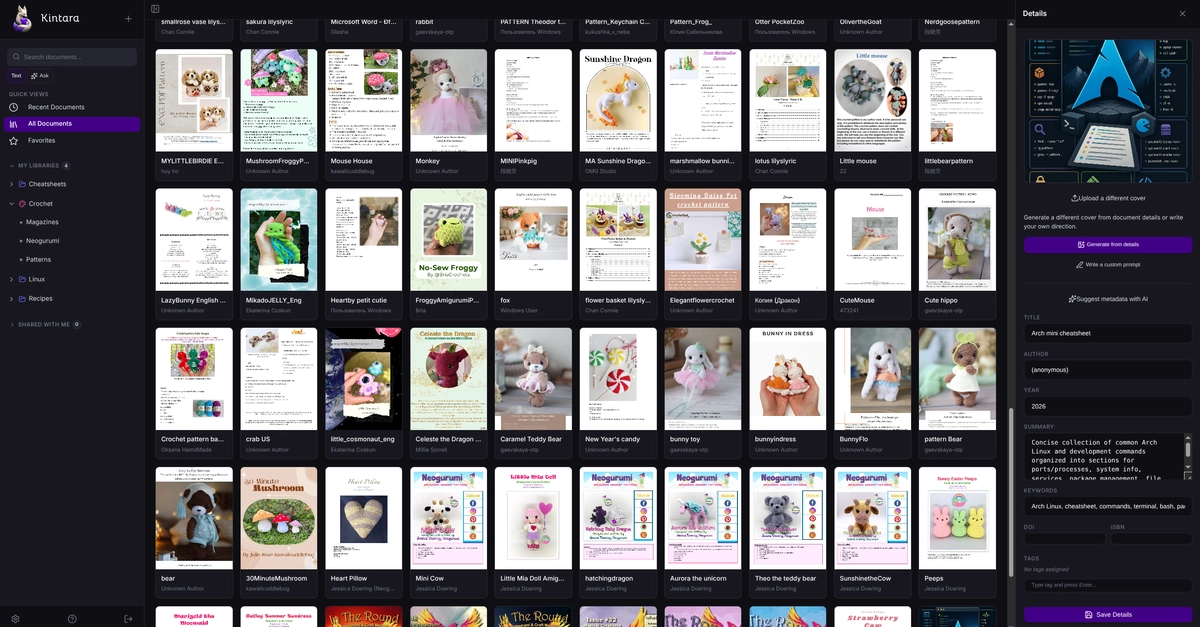
At its core, Kintara operates as a Dockerized application that meticulously watches a designated folder on your system. Users simply drop files—be they PDFs, Markdown documents, or plain text files—into this watched directory. Kintara then springs into action, automatically indexing the content, extracting searchable text and relevant metadata, and even generating thumbnail previews for visual identification. The entire library becomes accessible through a web browser or as an installable Progressive Web App (PWA), offering a seamless experience across devices.
Architectural Evolution and Core Features
The development journey of Kintara, spanning a few months, was marked by significant architectural shifts. Initially, the project incorporated a Tauri desktop shell, aiming for a native application feel. However, the developer soon realized this approach did not align with the desired cross-platform accessibility and flexibility. The desktop layer was ultimately removed and the architecture was rebuilt around a single Rust server responsible for serving both the API and the frontend. This pivot allows Kintara to be pointed at a Network Attached Storage (NAS) folder, making the entire library accessible from any device—desktop, laptop, tablet, or phone—without requiring local installations on each machine.
Kintara is packed with features designed for efficient document management and reading. Its capabilities include:
- Libraries and Collections: Users can organize documents into distinct libraries and further group them into custom collections.
- Tagging System: A flexible tagging system allows for granular categorization and retrieval of documents based on user-defined tags.
- Full-Text Search: Powerful full-text search functionality enables users to quickly find specific information within any document, regardless of its format.
- Metadata Extraction: Automatic extraction of metadata from files helps in understanding document properties and context.
- Thumbnails Generation: Visual previews are generated for documents, aiding in quick identification and browsing.
- Reading Progress Tracking: The application remembers where users left off in each document, facilitating uninterrupted reading sessions.
- Highlights and Favorites: Users can highlight important passages within documents and mark documents as favorites for easy access.
- Private Library Sharing: Kintara supports sharing libraries privately with other users.
- GitHub OAuth: Integration with GitHub OAuth provides a secure and convenient way for users to authenticate and manage access.
Technical Underpinnings and Deployment
The choice of Rust for the backend server is strategic, leveraging the language's performance, memory safety, and concurrency capabilities. This foundation ensures that Kintara can efficiently handle indexing, searching, and serving large document libraries without performance bottlenecks. The Docker deployment model simplifies setup and management, allowing users with varying technical expertise to deploy Kintara on their own infrastructure. Whether running on a personal NAS, a home server, or a cloud instance, Kintara provides a consistent self-hosted experience.
The PWA aspect of Kintara is particularly noteworthy. By offering an installable PWA, the application bridges the gap between web-based access and native application usability. This means users can add Kintara to their home screens on mobile devices or install it as a desktop application, gaining offline access capabilities and a more integrated user experience, akin to traditional desktop software, but with the benefits of cloud synchronization and remote access inherent in its server-client architecture.
Broader Implications for Personal Knowledge Management
Kintara enters a space increasingly populated by personal knowledge management (PKM) tools, yet it carves out a distinct niche by focusing on self-hosting and a broad range of document types. Unlike many cloud-centric PKM solutions, Kintara offers users complete control over their data, addressing privacy concerns and the potential for vendor lock-in. The ability to point the system at an existing folder structure on a NAS is a significant advantage for users who have already invested in local storage solutions.
The project's origin story—a hobbyist solving a personal problem—is a common narrative in the open-source and developer community. It highlights how individual needs can drive innovation and lead to tools that benefit a wider audience. While Kintara is currently a personal project, its feature set and architectural robustness suggest a promising future for users seeking a powerful, private, and flexible document management system that truly belongs to them.