Understanding the "Bad File Descriptor" Error in iperf3
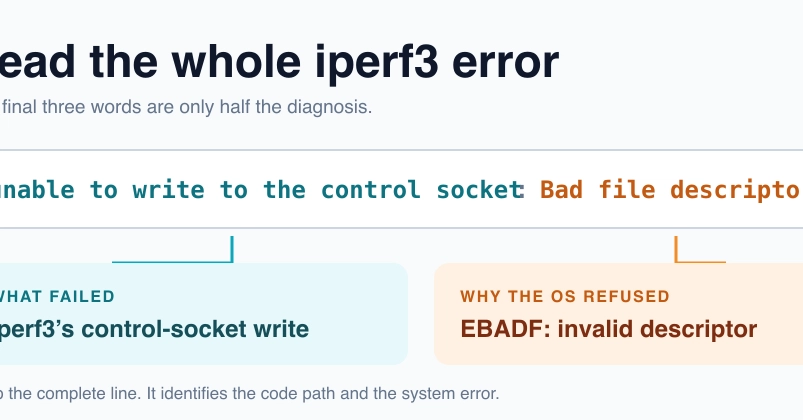
When using iperf3, a common network performance testing tool, you might encounter the cryptic error message: iperf3: error - unable to write to the control socket: Bad file descriptor. This error originates from the operating system (OS) and indicates that a file descriptor, a handle used by the OS to access files or network sockets, is invalid or has been closed prematurely. The message itself is a combination of iperf3's operation (e.g., writing to a control socket) and the OS's error code (EBADF, or "Bad file descriptor").
The Bad file descriptor part is the OS telling you it received an invalid handle. It doesn't specify *what* operation failed, only that the handle provided was no good. The preceding text, such as unable to write to the control socket, tells you where in the iperf3 process the error occurred. In this specific case, iperf3 attempted to write data to its control socket, but the OS rejected the file descriptor associated with that socket.
Common Causes and Troubleshooting Steps
Several factors can lead to a "Bad file descriptor" error in iperf3. Most often, it boils down to issues with how the iperf3 processes are managed, especially in scenarios involving multiple instances or long-running tests.
1. Process Management and Orphaned Descriptors
The most frequent culprit is the improper management of iperf3 processes. If an iperf3 client or server process is terminated abruptly, killed by the OS (e.g., due to resource constraints), or otherwise exits unexpectedly, it can leave behind open file descriptors that are no longer valid. When another iperf3 instance or a related process tries to use these stale descriptors, the OS returns EBADF.
This is particularly common in scripting environments or automated testing frameworks where processes might be started and stopped rapidly. If a parent process dies before its child iperf3 processes have fully cleaned up their resources, those child processes might inherit or attempt to use invalid descriptors.
What to check:
- Ensure that all previously running iperf3 processes (both client and server) have been terminated cleanly. Use tools like
ps aux | grep iperf3(on Linux/macOS) or Task Manager (on Windows) to identify and kill any lingering processes. - If you are using a script to manage iperf3, verify that it properly handles process termination and waits for iperf3 instances to exit gracefully. Implement signal handling to ensure cleanup.
2. Network Interface Issues
While less common, issues with the underlying network interfaces can sometimes manifest as descriptor errors. If an interface becomes unavailable or is reconfigured while iperf3 is active, the socket associated with that interface might become invalid.
What to check:
- Verify that the network interfaces specified in your iperf3 command (e.g., using the
-Bflag) are active and correctly configured on both the client and server machines. - Check for any network interface errors reported by the OS or network monitoring tools.
3. Incorrect iperf3 Usage or Configuration
Though the error message points to an OS-level issue, incorrect usage of iperf3 flags or configurations can indirectly lead to such states. For example, attempting to bind to a non-existent or inaccessible port, or using specific flags in incompatible combinations, might trigger unexpected behavior that results in descriptor problems.
What to check:
- Review your iperf3 command-line arguments for any typos or logical errors.
- Ensure you are using compatible versions of iperf3 on both client and server. While iperf3 is generally backward compatible, significant version differences can sometimes lead to unexpected interactions.
- If you are using iperf3 in a complex setup (e.g., with proxies or tunnels), ensure these intermediary components are not interfering with the control socket.
4. Operating System or Library Issues
In rare cases, the issue might stem from a bug within the operating system's networking stack or the C standard library (libc) that iperf3 relies upon. These are typically harder to diagnose and often require OS updates or patches.
What to check:
- Ensure your operating system is up-to-date with the latest patches and updates.
- If the problem persists across different machines and configurations, consider if there might be a more systemic OS-level issue.
The Anatomy of the Error Message
It's crucial to dissect the full error message to understand its origin. The structure is typically:
iperf3: [iperf3 operation]: [OS errno string]
For example, in iperf3: error - unable to write to the control socket: Bad file descriptor:
iperf3: error -: Indicates an error condition reported by iperf3.unable to write to the control socket: This is the iperf3 operation that failed. It means iperf3 attempted to send data or commands through its primary control channel, which is essential for setting up the test and coordinating the client and server.Bad file descriptor: This is the error message from the underlying operating system. It corresponds to theEBADFerror code, signaling that the file descriptor iperf3 tried to use for writing was invalid.
By understanding this breakdown, you can pinpoint whether the problem lies within iperf3's logic or the OS's handling of its resources.
When to Seek Further Help
If you've exhausted these troubleshooting steps and the "Bad file descriptor" error persists, consider the following:
- Consult iperf3 documentation and mailing lists: Others may have encountered similar issues.
- Simplify your test setup: Try running a basic iperf3 test between two local machines to rule out complex network configurations.
- Report the issue: If you suspect a bug in iperf3 itself or believe it's an OS-level problem, filing a detailed bug report with relevant system information and steps to reproduce is essential.
Resolving a "Bad file descriptor" error often requires a systematic approach, starting with the most common causes like process management and gradually moving to more complex system-level diagnostics.