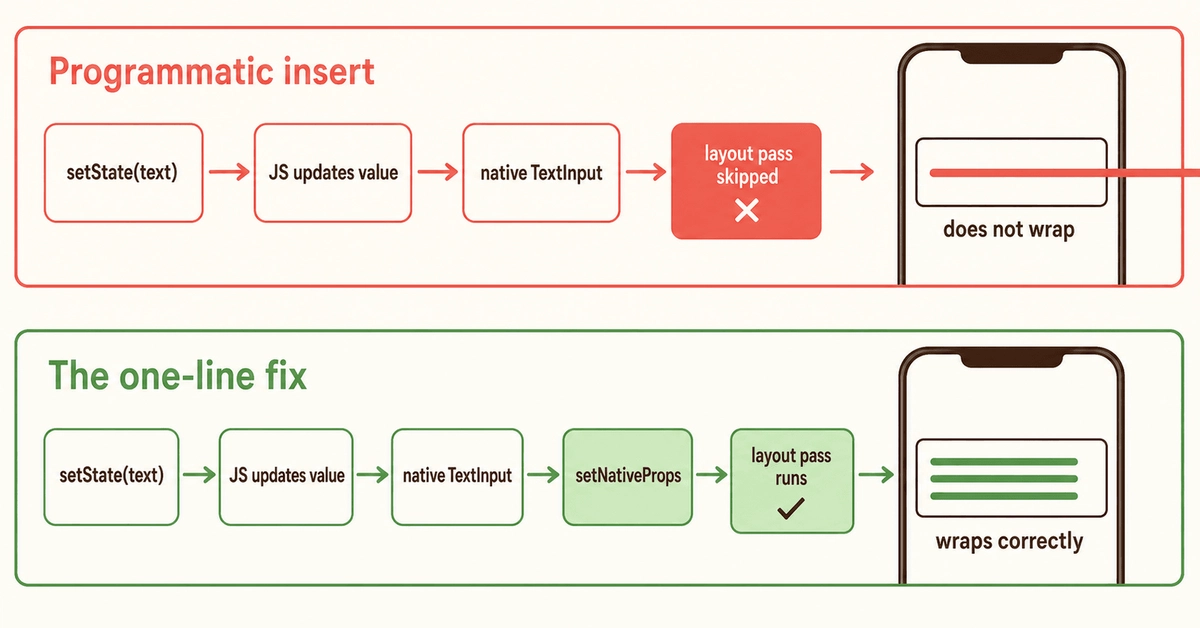
The Bug: Text Clipping in iOS Multiline TextInputs
Developers using React Native's multiline TextInput component on iOS have likely encountered a frustrating bug: text clipping after programmatic inserts. This issue arises when inserting text, such as user mentions or emojis, into a TextInput that has already wrapped to a second line. Instead of the input correctly resizing to accommodate the new line, the text is rendered outside the bounds of the input field, appearing clipped and inaccessible.
This problem was recently detailed by a developer who experienced it firsthand while working with the react-native-controlled-mentions library. The scenario typically involves a TextInput with a suggestions dropdown. When a user triggers a suggestion (e.g., by typing '@') and selects an item, the library inserts a styled name into the text field. While short insertions are handled gracefully, the bug surfaces when the inserted text pushes the existing content beyond the input's width, forcing a line break. At this point, the TextInput fails to adjust its height, and the newly wrapped line becomes invisible, clipped by the container's fixed height.
Crucially, the text is not lost. Standard interaction methods still function as expected. Text selection, including select-all operations, correctly captures the entire content. The cursor also positions itself logically, indicating that the application's logic is aware of the full text. However, the visual rendering is broken. The container remains sized for a single line, even though the underlying data clearly comprises multiple lines.
This behavior is specific to iOS. Android and web implementations of React Native's TextInput do not exhibit this clipping issue. The underlying cause appears to be how the native iOS `UITextView` component handles layout and resizing in conjunction with certain types of programmatic text manipulation, particularly when styled attributes are involved.

Understanding the Root Cause
The behavior stems from a subtle interaction between React Native's JavaScript layer, the native iOS bridge, and the underlying `UITextView` implementation. When text is programmatically inserted, especially with styling applied (as is common with mentions or rich text), the `UITextView` might not always receive the correct layout update signals to re-calculate its intrinsic content size accurately. This is compounded by the fact that multiline text inputs on iOS, by default, do not automatically grow indefinitely. Their height is managed based on content, but the update mechanism can falter under specific conditions.
The `react-native-controlled-mentions` library, for instance, likely uses native text attributes to style the inserted mentions. These attributes can influence how the text is measured and laid out. When the measurement fails to account for the new line created by the insertion, the `UITextView`'s frame doesn't expand vertically. The `TextInput` component in React Native, which wraps this native view, inherits this layout constraint. The result is that the text buffer contains two lines, but the visual viewport only displays the first line.
This isn't a bug in the styling library itself, but rather an edge case in how the native iOS `UITextView` responds to programmatic changes that affect line wrapping. The standard text input methods, like user typing, typically trigger more robust layout recalculations. Programmatic updates, especially those involving complex attributed strings, can sometimes bypass or trigger these recalculations in an incomplete manner.
The One-Line Native Fix
Fortunately, the solution is remarkably simple and requires a minimal native code change. The fix involves forcing a layout update on the `UITextView` after the text has been programmatically inserted. This can be achieved by adding a specific line of code within the native iOS component that handles the text input.
For developers using React Native, this means modifying the native code that bridges the JavaScript TextInput to the iOS `UITextView`. The key is to ensure that after the text is set programmatically, the component's layout is explicitly invalidated and re-calculated. The specific line of code that resolves this issue in the native `UITextView` is typically:
[self layoutIfNeeded];This command tells the view to immediately lay out its subviews, recalculating its own size and the size of its children based on the current content. By invoking layoutIfNeeded after a programmatic text insertion, the `UITextView` is prompted to correctly adjust its height to accommodate the newly wrapped line of text.
Implementing this fix involves navigating to the relevant native Objective-C or Swift file within your React Native project's `ios` directory that manages the TextInput component. You would typically find this within the `RCTTextView` class or a related component responsible for rendering the text input. Adding [self layoutIfNeeded]; (or its Swift equivalent) at the appropriate point, usually after the text content has been updated, will resolve the clipping issue.
This one-line change effectively bypasses the native layout update deficiency, ensuring that multiline TextInput components on iOS correctly resize when text is programmatically inserted and causes a line wrap. It's a testament to how sometimes, a small native adjustment can solve complex cross-platform UI quirks.
Implications and Broader Context
This bug, while seemingly minor, can significantly impact user experience in applications relying on rich text inputs, such as chat applications, note-taking tools, or social media platforms where mentions, tags, or emojis are common. The visual glitch of clipped text can make an application appear unprofessional and hinder usability.
The existence of this bug highlights the ongoing challenge of maintaining perfect UI parity across platforms, especially when dealing with native component behaviors that don't always align perfectly with the cross-platform abstractions provided by frameworks like React Native. While React Native aims to provide a unified API, underlying native differences can surface in edge cases like this.
For developers, this serves as a valuable lesson: when encountering UI rendering issues on a specific platform, especially with complex components like text inputs, delving into the native implementation might be necessary. The solution, as demonstrated, can sometimes be a straightforward native call that ensures correct layout behavior.
The broader implication is the continued need for developers to be aware of platform-specific nuances. While libraries like react-native-controlled-mentions abstract away much of the complexity, developers must be prepared to address platform-specific bugs when they arise. This fix, being a single line of native code, is relatively easy to implement and maintain, especially if packaged into a small, reusable native module or patch for the React Native core components.
What remains unaddressed by this fix is the broader question of how React Native's core team and the community can proactively identify and mitigate such native-specific UI bugs before they impact a wide range of applications. Future versions of React Native might incorporate this fix directly into the `RCTTextView` component, making it a non-issue for all developers. Until then, understanding and applying this native solution remains essential for those building sophisticated text input experiences on iOS.