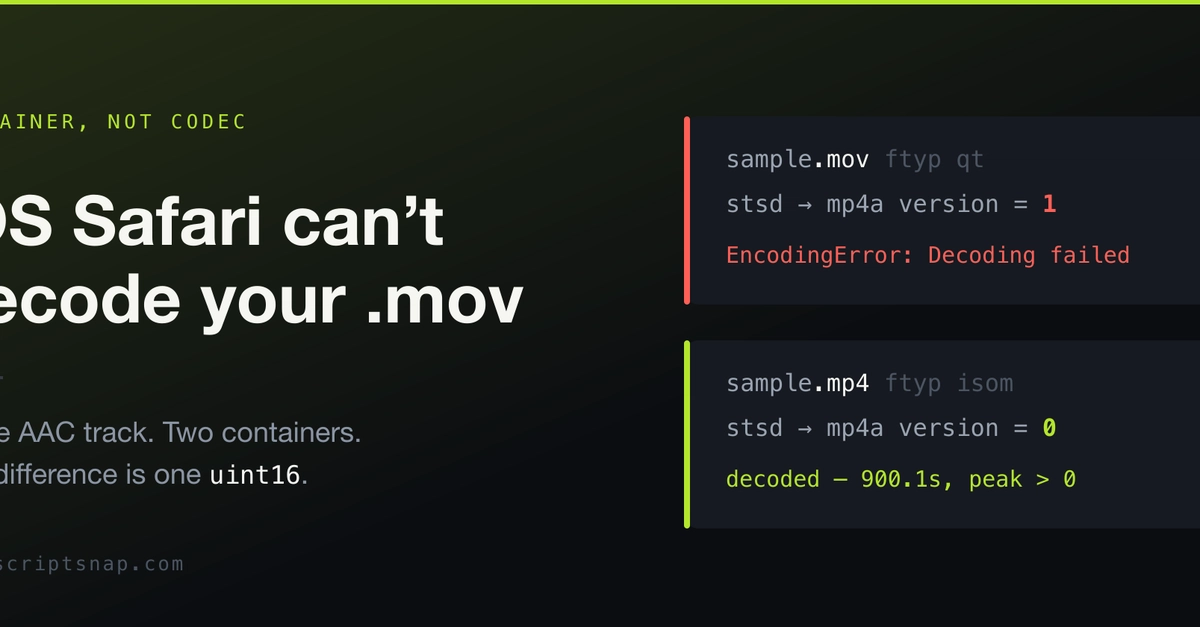
The Silent Bug: .mov Decoding Failure on iOS Safari
Web applications that rely on direct video uploads and browser-based processing are encountering a persistent, yet elusive, bug: iOS Safari consistently fails to decode .mov files. The issue, first detailed by developer Deland, is not a limitation of the codec or audio data itself, but rather a subtle flaw buried deep within the container's metadata. This problem exclusively affects mobile Safari, leaving desktop browsers unaffected and creating a frustrating blind spot for developers.
The impact is significant. For applications like Deland's, which uses Whisper running locally via transformers.js to transcribe audio directly in the browser without uploads, analytics revealed a stark reality: .mov uploads on mobile failed 100% of the time. This wasn't a partial failure or a sporadic glitch; it was a complete roadblock for a specific file type on a specific platform. The absence of this issue on desktop browsers points to a platform-specific parsing or decoding discrepancy.
Diagnosing the Discrepancy
The core of the problem lies in how Safari's media pipeline interprets the QuickTime Movie (`.mov`) container. The QuickTime container format, developed by Apple, is a multimedia framework that stores various types of data, including video, audio, text, and effects. Its structure is hierarchical, with atoms (or boxes) defining different data types and their properties. The issue arises from a specific atom that describes the track's data, particularly its duration and timing information.
Deland's investigation involved a controlled experiment: taking an AAC audio track and encapsulating it within two different container formats. The audio data itself remained identical, byte-for-byte. The only difference was the wrapper – the container. This isolation proved crucial, demonstrating that the audio codec was not the culprit. The problem was squarely with the container's interpretation by Safari.
The specific problematic atom in question is the 'tkhd' atom, which contains track header information. This atom includes fields for track duration, volume, and other metadata. The bug manifests when certain values within this atom, particularly those related to the track's time scale or duration, exceed a particular threshold or are represented in a way that Safari's parser struggles with. The issue is reportedly tied to the representation of the track's duration and timing, specifically how it's stored within the 'tkhd' atom.
The Two-Byte Culprit
The root cause, as pinpointed, is a discrepancy in how the duration information is stored or interpreted. While not explicitly detailed as a specific byte value in public reports, the implication is that a two-byte field or a specific bit pattern within the 'tkhd' atom is causing Safari's media decoder to fail. This is a remarkably small detail to cause such a complete breakdown. It's akin to a single misplaced comma in a critical legal document that renders the entire contract void.
This is not an issue with the underlying audio or video codecs themselves. The AAC audio track, for instance, was perfectly valid and decodable. The problem was solely with the metadata wrapper. When this metadata is presented to iOS Safari in a specific format, the browser's media engine fails to initialize the decoding pipeline, leading to an outright failure of playback or processing. Desktop Safari, and indeed most other modern browsers and media players, correctly parse this metadata and proceed with decoding, highlighting a divergence in implementation or interpretation of the QuickTime specification.
Workarounds and Solutions
The challenge for developers has been finding a way to work around this Safari-specific limitation without resorting to heavy client-side transcoding libraries like ffmpeg.wasm or complex WebCodecs implementations, which can significantly increase application size and processing overhead.
One effective workaround involves modifying the 'tkhd' atom directly. By programmatically adjusting or recalculating the duration values within this atom, the container can be made palatable to iOS Safari. This often involves reading the atom, updating specific fields, and then writing the modified atom back into the container. This can be achieved using JavaScript libraries that are capable of parsing and manipulating the QuickTime container structure.
Another strategy, particularly if the goal is purely audio extraction, is to re-containerize the audio stream into a more universally compatible format like MP4 or even an uncompressed format if subsequent processing allows. This can be done server-side or, in some cases, with lighter-weight client-side tools that focus on container manipulation rather than full transcoding.
The underlying principle is to present the metadata in a format that iOS Safari's media stack expects. This often means ensuring that duration, time scale, and other critical timing information are represented within a range or format that the browser reliably parses. The 'tkhd' atom's duration field, for example, is a 32-bit unsigned integer, but the way it interacts with other fields like the time scale can lead to overflows or misinterpretations if not handled carefully.
Broader Implications
This bug underscores a persistent challenge in web development: the fragmentation of media decoding and rendering capabilities across different browsers and operating systems. While standards aim for universality, subtle implementation differences can lead to significant compatibility issues. For developers building rich media experiences, especially those involving user-uploaded content, a robust understanding of media container formats and their platform-specific interpretations is essential.
The fact that a two-byte anomaly can cripple functionality highlights the fragility of complex media pipelines. It suggests that Safari's parser might be more sensitive to specific numerical representations or bit patterns than other engines. This could stem from legacy code, specific optimizations, or simply a different interpretation of ambiguous parts of the QuickTime specification.
For developers currently facing this issue, the immediate path forward involves either modifying the metadata of incoming .mov files or considering alternative container formats for uploads. The long-term solution likely lies with Apple addressing this parsing quirk in a future iOS update, but until then, proactive handling of .mov files on the client or server is necessary to ensure a seamless user experience on iOS devices.