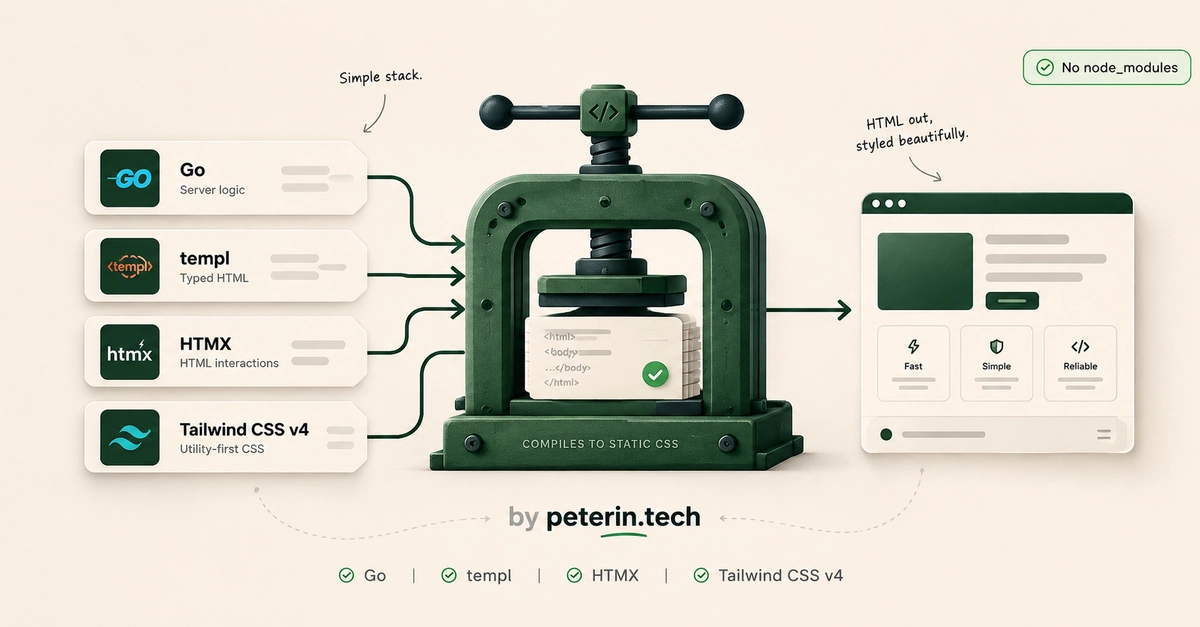
Why This Stack Matters in 2026
The promise of modern web development often leads developers down rabbit holes of complex tooling, heavy JavaScript frameworks, and massive node_modules directories. For those who just want to style a Go application, this can be frustrating. Many tutorials still point to outdated Tailwind CSS configurations and Node.js-dependent build processes that are no longer necessary. In 2026, a simpler, more integrated approach is not only possible but preferable for many projects. This guide outlines a setup that leverages Go for server-side rendering, templ for type-safe HTML components, HTMX for dynamic interactions without full page reloads, and Tailwind CSS's standalone executable for efficient styling.
The key advantage is eliminating the frontend build pipeline entirely. Instead of managing JavaScript dependencies and transpilation, you integrate styling directly into your Go application using Tailwind's modern, single-file executable. This results in faster development cycles, smaller deployment artifacts, and a significantly reduced cognitive load for developers focused on backend logic and server-rendered UIs.
Where templ Fits In
templ is a modern HTML templating language for Go that compiles to type-safe Go functions. It allows you to write HTML directly within your Go code, providing static typing for your components. This means you get compile-time checks for your HTML structure and data binding, catching errors early in the development process. Unlike traditional Go template packages, templ offers a more expressive and robust way to build complex UIs, resembling modern frontend component models but staying firmly on the server.
Consider a simple templ component:
package main

import (
	_ "github.com/a-h/templ"
)

typedef struct {
	Name string
}

 templ.Component {
	Name string
}

func (c UserCard) Render() templ.Component {
	return templ.RawTemplate(
		<div class=\"p-4 border rounded\">{c.Name}</div>
	)
}
This component, when rendered, produces clean HTML. The type safety ensures that if you pass incorrect data types or miss required attributes, the Go compiler will flag it. This integration is seamless with Go's standard library and other backend services.
A Tiny HTMX Example
HTMX is a library that allows you to access modern browser features directly from HTML, reducing the need for JavaScript. It enables developers to make AJAX requests, update DOM elements, and trigger client-side events using attributes on HTML tags. This is perfect for server-rendered applications where you want dynamic behavior without a full client-side framework.
Imagine a button that fetches new content from the server without a page refresh. In your Go application, you would have an endpoint that returns HTML fragments. Then, in your templ template, you'd use HTMX attributes:
<!DOCTYPE html>
<html>
<head>
    <title>HTMX Example</title>
    <script src="https://unpkg.com/htmx.org@1.9.12"></script>
</head>
<body>
    <div id="content" hx-get="/api/data" hx-trigger="click" hx-target="#content">
        Click to load data
    </div>
</body>
</html>
When the user clicks the div, HTMX makes a GET request to /api/data. The server responds with HTML, and HTMX swaps the content of the div with the response. This pattern is incredibly powerful for building interactive UIs with minimal JavaScript.
Tailwind CSS v4: The Standalone Setup
Tailwind CSS v4 has moved towards a standalone executable, eliminating the need for Node.js and complex build configurations for many use cases. This is a significant shift for developers who want to integrate Tailwind's utility-first CSS into non-JavaScript-heavy applications.
The core idea is to download a single binary that handles all your CSS compilation. You configure it via a simple tailwind.config.js (or JSON) file, and then run the executable. It scans your project for class names and generates the necessary CSS. This is a massive simplification compared to previous versions that relied on Node.js, Webpack, or other bundlers.
To get started, you download the Tailwind CLI binary for your operating system. For example, on macOS or Linux, you might download the tailwindcss-linux-amd64 file and make it executable.
The Commands You Will Actually Use
With the Tailwind CLI in place, your workflow becomes remarkably straightforward. You'll primarily interact with the Go compiler and the Tailwind executable.
1. Compile Go and templ:
go build -o myapp .
This command builds your Go application, which includes pre-compiled templ components. The templ compiler is typically integrated into your Go build process via its plugin system or by running templ generate beforehand.
2. Compile Tailwind CSS:
./tailwindcss -i ./input.css -o ./output.css --watch
This command tells Tailwind to watch your project files (specified by the --watch flag) for class name changes, compile them from your input.css (which typically imports Tailwind directives) into output.css. The output.css file is then linked in your HTML templates.
The --watch flag is crucial for development. It recompiles your CSS automatically whenever you save changes to your Go or template files that use Tailwind classes. This provides a near-instantaneous feedback loop, similar to what frontend developers are accustomed to, but without the JavaScript overhead.
Combining these commands, perhaps within a simple shell script or a task runner, allows for a streamlined development experience. For instance, a Makefile could orchestrate both the Go build and the Tailwind watch process.
Putting It All Together
This stack provides a compelling alternative for building web applications in 2026. It prioritizes developer experience through type safety and efficient tooling while minimizing complexity. By embracing Go's backend strengths, templ's component model, HTMX's dynamic interactions, and Tailwind's standalone CSS compilation, you can build performant, maintainable, and modern web applications without the burden of a full JavaScript frontend framework.