The Problem: AI Agents Collide
Developers frequently encounter a frustrating bottleneck when using AI coding assistants like Claude Code or GitHub Copilot. While a single agent can efficiently assist with one task within a repository, the system breaks down when attempting to run multiple agents concurrently. Imagine initiating a task for user authentication in one terminal and simultaneously requesting assistance with payment processing in another. Both agents, operating within the same working directory and on the same checked-out branch, begin modifying files. This simultaneous file access leads to chaos, overwriting changes, and corrupted codebases. The core issue stems from multiple processes contending for control of the same file system state.
Traditional development workflows, even with feature branches, typically involve one developer or one primary task per working copy. When multiple AI agents attempt to act as independent developers on the same branch, they don't have the isolation needed to function correctly. This isn't a limitation of the AI models themselves, but rather a consequence of the shared environment they operate within. Without a mechanism to separate their workspaces, their operations inevitably interfere with each other, making parallel AI-assisted development impractical.
The Solution: Git Worktrees for Isolation
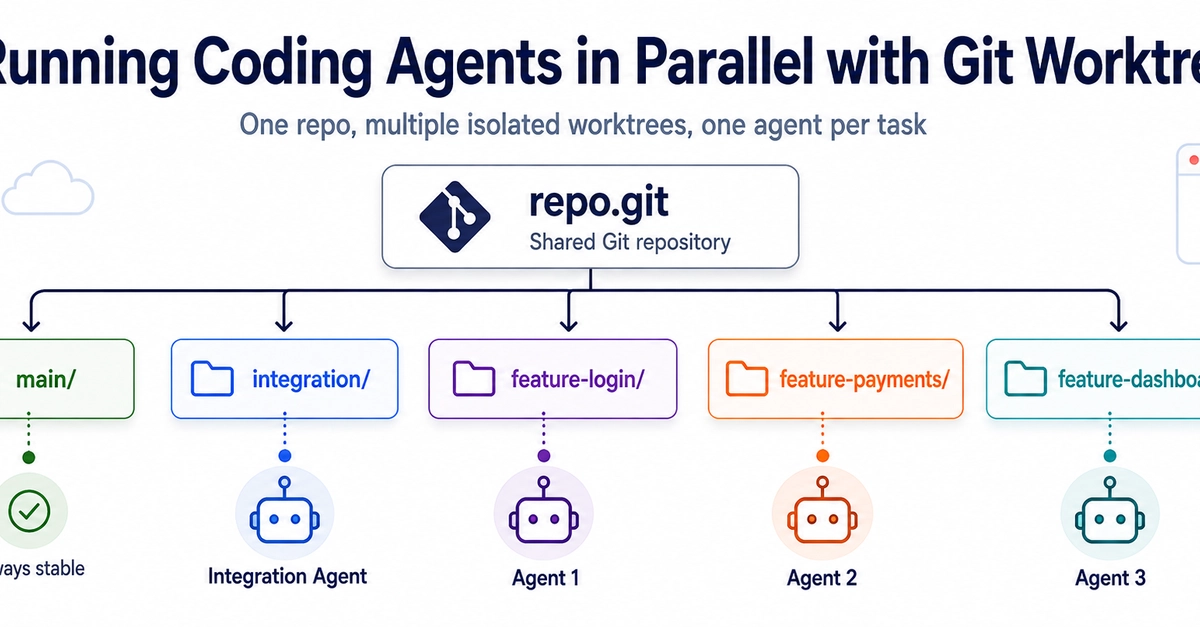
Git worktrees provide an elegant and powerful solution to this problem. A Git worktree allows you to have multiple working directories, each checked out to a different branch or commit, all associated with the same Git repository. This means you can maintain separate, isolated environments for each coding agent, even if they are working on the same project.
Here's how it works: Instead of running all your agents within a single cloned repository, you create a new worktree for each agent or task. Each worktree is essentially a separate directory containing a full checkout of your repository's files, but it shares the same underlying Git history and objects as the main repository. This isolation is key. When Agent A is modifying files in /path/to/repo/worktree-auth and Agent B is working in /path/to/repo/worktree-payments, they are operating on entirely independent copies of the codebase at the file system level. This eliminates the possibility of them overwriting each other's changes.
Implementing Parallel Agents with Worktrees
To implement this, you would typically start with your main repository checked out to your primary branch (e.g., main or develop). Then, for each distinct task you want an AI agent to work on, you create a new worktree:
# In your main repository directory
git worktree add ../repo-auth main
git worktree add ../repo-payments main
This command creates two new directories, ../repo-auth and ../repo-payments, each containing a checkout of the main branch. You can then configure your AI agents to operate within these separate directories. For instance, you might launch your authentication agent within ../repo-auth and your payments agent within ../repo-payments. Each agent would see its own isolated working copy, unaware of the other's existence beyond the shared Git history.
When an agent completes a task or suggests changes, the output can be managed through standard Git operations. You can commit the changes within a specific worktree, create a new branch from that worktree's state, and then merge those changes back into your main development branch using pull requests or direct merges. This preserves the integrity of your main development workflow while enabling parallel AI assistance.
Consider the process for a new feature that involves both user profile updates and email notifications. You could create two worktrees, one for profile updates and one for notifications, both checked out to a feature branch (e.g., feature/user-enhancements). Agent 1 works on profile logic in worktree-profile, and Agent 2 works on email logic in worktree-notifications. Once both agents have completed their respective parts, you can commit the changes in each worktree, potentially onto separate temporary branches, and then merge them into the main feature/user-enhancements branch.
Benefits Beyond Conflict Resolution
The advantages of using Git worktrees extend beyond simply preventing AI agent conflicts. This approach also:
- Enhances Productivity: Developers can leverage multiple AI assistants for different aspects of a feature concurrently, significantly speeding up development cycles.
- Simplifies Testing: Each worktree can be configured with different testing setups or dependencies if needed, allowing for isolated testing of specific components.
- Improves Code Quality: By allowing specialized agents to focus on distinct areas, the overall quality and coherence of the code generated can improve.
- Reduces Context Switching: Developers don't need to manually switch branches or reset their working directory between different AI-driven tasks.
This method transforms how AI coding assistants can be integrated into the development workflow. Instead of viewing them as single-task tools, developers can orchestrate them as a team of specialized workers, each operating in its own clean environment. This makes parallel AI-assisted development not just possible, but practical and scalable.
The Future of AI-Assisted Development
As AI coding assistants become more sophisticated, the ability to run them in parallel will be crucial for maximizing their utility. Git worktrees offer a mature, built-in Git feature that addresses the fundamental challenge of workspace isolation. This approach allows developers to scale their use of AI tools without succumbing to the chaos of conflicting file edits. The question now is how quickly IDEs and AI agent platforms will integrate worktree management directly into their UIs to make this workflow even more seamless for the average developer.