The Cost of Context Switching
When your team merges changes to the main branch, your local copy can quickly become stale. The standard workflow involves switching to the main branch, pulling the latest changes, and then switching back to your working branch. This process, often executed with git switch main, git pull, and git switch -, works. However, it incurs significant overhead. Modern development environments often involve long-running processes like dev servers, build watchers, and complex file generation pipelines. Each context switch can trigger these processes, leading to restarts, refires, and churn. If the `.gitignore` file has changed, you might even return to a messy working directory filled with untracked files. This is two context switches just to move a single pointer.
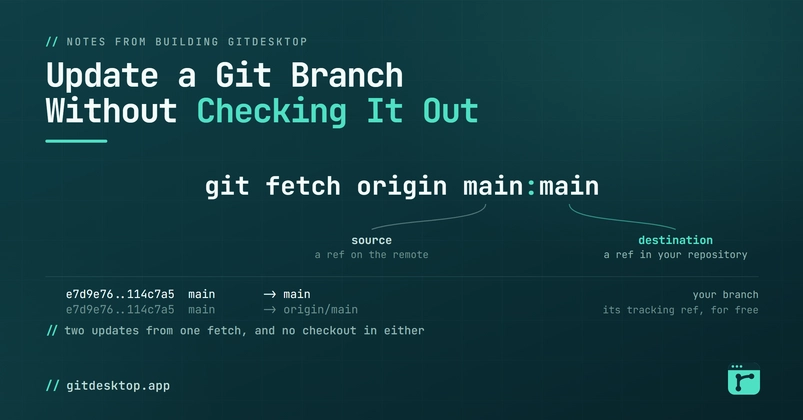
What if you could simply update the pointer without the disruptive checkout? Git is a powerful tool, and it offers precisely this capability, often overlooked in favor of the familiar checkout-pull-checkout cycle. This allows you to keep your current branch checked out while ensuring its remote counterpart is up-to-date with the latest commits. This is particularly useful when you need to rebase onto an updated main branch, or simply want your local branch to reflect the absolute latest state of the remote without disrupting your current work context.
Direct Branch Pointer Updates
Git provides a mechanism to update a branch pointer directly, without checking out the branch itself. The key command here is git fetch combined with git rebase --onto or simply updating the remote-tracking branch. For instance, if you want to update your local main branch to match the remote origin/main without leaving your current feature branch, you can achieve this efficiently.
The most direct way to update a remote-tracking branch locally is using git fetch. When you run git fetch origin, Git downloads commits and objects from the remote repository and updates your remote-tracking branches (like origin/main). Your local branches, such as main, remain untouched. This is the first critical step: ensuring your local repository has knowledge of the latest commits on the remote.
Consider the scenario where your local main branch is behind origin/main. You are currently on branch feature-x and want to bring main up-to-date for a rebase operation or to inspect the latest changes. Instead of checking out main, pulling, and checking back out, you can use a more streamlined approach.
Updating Without Checkout: The `git rebase --onto` Method
A powerful, though less commonly known, technique involves using git rebase --onto. This command is typically used to reapply a series of commits onto a different base. However, it can be leveraged to effectively update a branch pointer.
Let's say you have a local branch `my-feature` that you want to update based on the latest `origin/main`. You are currently on `my-feature` and do not want to check out `main`. First, ensure your `origin/main` is up-to-date:
git fetch origin
Now, you want to rebase your current branch (`my-feature`) onto the latest `origin/main`. The standard way to do this would be:
git checkout main
git pull origin main
git checkout my-feature
git rebase main
But we want to avoid the checkouts. The `git rebase --onto` command allows us to specify the new base directly. The syntax is git rebase --onto . In our case, we want to rebase `my-feature` onto `origin/main`, effectively discarding the old base (which is the current `main` in your local repo before the fetch). However, a more direct application for simply updating a branch's *remote* state is often misunderstood. The true power here is not in rebasing your current branch onto an updated remote, but in updating the *pointer* of a branch you are not on.
The command git update-ref is the underlying mechanism Git uses to move branch pointers. However, it's a low-level command and not typically used directly for this purpose by most developers. A more practical approach for updating a branch pointer without checking it out often involves using git branch -f (force) or specific fetch/merge strategies.
Leveraging `git fetch` and `git merge` (with caution)
While not directly updating a branch pointer you aren't on, you can achieve a similar outcome for your *current* branch by updating its remote-tracking counterpart and then merging. This is more about updating your local branch to reflect the remote, rather than updating a separate branch pointer.
If you want to update your *current* branch (say, `my-feature`) to match `origin/my-feature` without checking it out:
git fetch origin my-feature
git merge origin/my-feature
This merges the latest `origin/my-feature` into your current `my-feature`. This is usually not what you want if you're trying to update `main` to rebase onto it later, but it illustrates updating a branch you're on without switching. The key is understanding that `git fetch` updates remote-tracking branches like `origin/main`.
The actual command to move a branch pointer without checking it out, for a branch you are *not* currently on, is surprisingly simple if you understand how Git works internally. You can directly manipulate the ref. For example, to move the local `main` branch to point to the same commit as `origin/main` without checking out `main`:
git update-ref refs/heads/main refs/remotes/origin/main
This command directly updates the reference file for the `main` branch to point to the commit that `origin/main` currently points to. This is the most direct way to achieve the goal of updating a branch pointer without checking it out. However, this bypasses the usual safety checks and history rewriting that might occur with `git pull` or `git rebase`.
A safer and more idiomatic way to achieve a similar outcome, especially for updating your *local* main branch to match the remote before rebasing your *current* feature branch, is:
git fetch origin
git branch -f main origin/main
This fetches all updates from `origin` and then forcefully moves your local `main` branch to match `origin/main`. You remain on your current feature branch. This command is powerful because it allows you to synchronize your local `main` pointer with the remote `origin/main` without ever checking out `main`. This preserves your current working context, avoiding the costly restarts and disruptions associated with context switching.
Referenced Sources
- verified