The Silent Threat in Terraform Plans
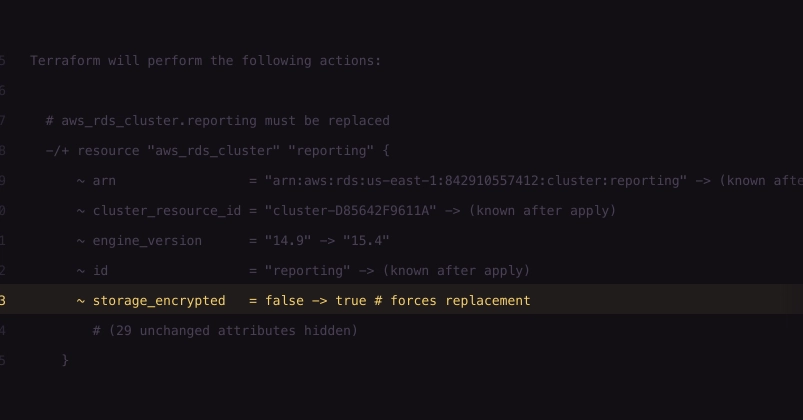
Terraform users often skim the terraform plan output, focusing on the additions and modifications. They might glance at lines indicating resource replacement, assuming it's a controlled, predictable event. However, a specific phrase, # aws_rds_cluster.reporting must be replaced, can signal a disaster waiting to happen. This isn't just a simple update; it's a directive for Terraform to destroy and then recreate a resource, potentially leading to significant data loss and downtime if not handled with extreme caution.
The crux of the issue lies in how Terraform manages state and resource lifecycles. When a resource's configuration changes in a way that Terraform deems incompatible with its current state, it flags the resource for replacement. This happens for various reasons: changing certain fundamental attributes of a resource (like the instance type of a database or the domain name of an SSL certificate), or when the underlying cloud provider API no longer supports in-place updates for a specific attribute. Terraform's plan will explicitly state that the resource must be replaced. This is not a suggestion; it's a command for deletion and recreation.
Consider an aws_rds_cluster resource. If you attempt to change attributes like the engine, engine_version, or the cluster_identifier itself, AWS RDS does not support in-place updates for these critical parameters. Terraform, recognizing this limitation, will propose to destroy the existing cluster and provision a new one with the updated configuration. The plan output will show a deletion (-) followed by a creation (+), with the must be replaced comment clearly indicating the destructive nature of this operation.

Why Replacement is Dangerous
The danger isn't just the downtime. When a resource is replaced, its old instance is terminated, and a new one is provisioned. For stateful resources like databases or storage volumes, this means the data associated with the old instance is lost unless specific, often complex, backup and restore procedures are meticulously followed. A simple mistake in the plan, a misinterpretation of the output, or an accidental confirmation of a destructive plan can lead to irreversible data loss. This is particularly perilous for production environments where data integrity and availability are paramount.
The problem is exacerbated by the fact that this line is often buried deep within a lengthy plan output. A plan for a large infrastructure might contain hundreds or even thousands of lines. Developers, under pressure or simply accustomed to seeing replacement operations for less critical resources, might overlook the severity of a replacement directive for a core component like a database cluster. They might focus on the green lines (creation) and blue lines (changes) and miss the red lines (destruction) that accompany a replacement.
Mitigation Strategies
Avoiding unintended resource replacements requires a multi-pronged approach:
1. Understand Resource Behavior
Before modifying any Terraform configuration, consult the official Terraform documentation for the specific resource type. Pay close attention to attributes marked as ForceNew or RequiresReplace. These are explicit indicators that changing these attributes will trigger a replacement rather than an in-place update. For AWS RDS, for instance, changing the engine or engine_version will force replacement.
2. Use Terraform's `-target` Flag Cautiously
While the -target flag can be useful for applying changes to specific resources during development or troubleshooting, it can also mask the full impact of a change. When used with a resource that requires replacement, it might lead you to believe you are only targeting that single resource, without fully grasping the implications of its destruction and recreation in the context of the entire infrastructure. Always run a full terraform plan without targeting before applying any changes, especially in production.
3. Implement Robust Review Processes
Code reviews for Terraform apply are essential. Ensure that team members scrutinize the terraform plan output, specifically looking for lines marked with must be replaced. Establish a checklist for reviews that includes verifying the impact of any proposed replacements, especially for critical stateful resources. Automated tools can also help flag these operations, but human oversight remains critical.
4. Employ State Management Best Practices
Terraform state is the source of truth for your infrastructure. Regularly back up your Terraform state. If a catastrophic replacement occurs, having a recent backup might be the only way to recover. Furthermore, consider using remote state backends with versioning enabled, which provides an audit trail and the ability to roll back to previous states.
5. Isolate Critical Resources
Where possible, architect your infrastructure to isolate critical stateful resources. For example, a production database cluster might be managed in a separate Terraform configuration or state file from less critical application components. This reduces the blast radius of accidental replacements and simplifies the review process for critical infrastructure changes.
The Unanswered Question: Developer Education
What remains a persistent challenge is the gap in developer education and awareness. While Terraform is widely adopted, the nuanced implications of resource replacement, especially for complex managed services, are not always fully understood. Many developers learn by doing, and the hard lessons learned from accidental data loss can be incredibly costly. More proactive training and emphasis on understanding the underlying cloud provider APIs that Terraform abstracts away are crucial.
The must be replaced line is not an error; it's Terraform communicating a fundamental constraint imposed by the cloud provider's API. It's a signal that a destructive operation is about to occur. Ignoring it, or failing to fully comprehend its implications, is akin to driving a car without looking at the speedometer or the road ahead. For anyone managing infrastructure as code, understanding and respecting this line is not optional—it's a critical requirement for maintaining stability and data integrity.