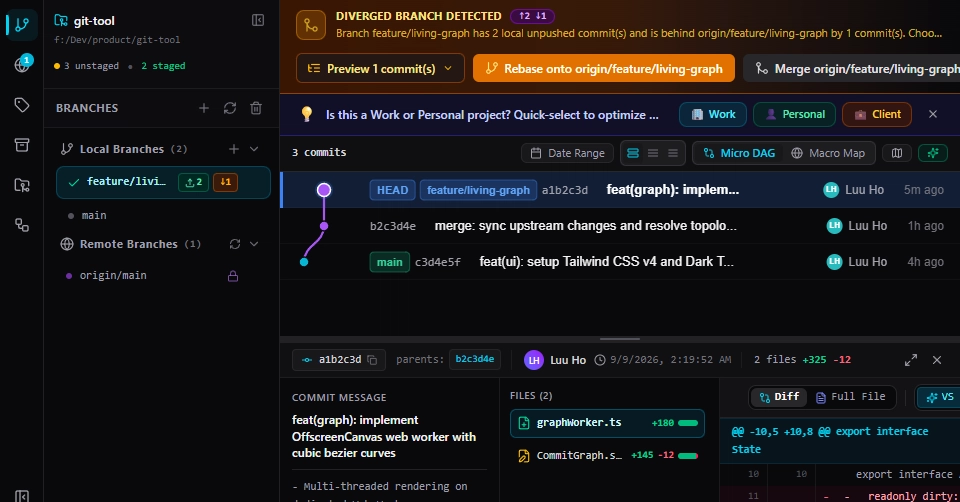
The Problem: Git's Dichotomy for Developers
For years, developers have grappled with a fundamental tension when interacting with Git: the choice between raw power and user-friendliness. On one side, the command-line interface (CLI) offers unparalleled flexibility and control. However, it demands a steep learning curve, high cognitive load, and carries the constant, chilling fear of irreversible mistakes like a misfired git reset --hard. On the other side, graphical user interface (GUI) clients have historically fallen into two camps: sluggish, outdated applications from the 2010s, or resource-hungry Electron-based applications. Clients like GitKraken, while feature-rich, can consume over 1.2 GB of RAM, demand costly subscriptions, and still pose a risk of permanent data loss if a user accidentally clicks 'Discard Changes'. FlowGit emerges from this landscape with a clear mission: to bridge this divide with a next-generation visual Git client.
FlowGit's Native Rust Architecture
At the core of FlowGit's design is a commitment to native performance and efficiency, eschewing the cross-platform frameworks that often lead to bloat. The client is meticulously built using Rust, a systems programming language renowned for its memory safety, concurrency, and performance without a garbage collector. This choice is deliberate. By leveraging Rust, FlowGit aims to deliver a client that is not only lightning-fast but also significantly lighter on system resources compared to its Electron counterparts. Imagine an application that launches instantly, scrolls through thousands of commits without a stutter, and doesn't hog your RAM while you're trying to compile code. This is the promise of a native architecture.
The client's graphical user interface is rendered using Skia, a 2D graphics library used by Google Chrome and Android. This allows for high-performance, 60 FPS animations and a smooth, responsive user experience that feels fluid and immediate. This focus on visual fidelity is central to FlowGit's philosophy of making Git operations intuitive and less intimidating.
Key Features: Visual First, Zero Terminal Friction
FlowGit differentiates itself through a suite of features designed to enhance developer productivity and reduce the cognitive burden associated with Git.
Visual Rebase and Merge with Drag-and-Drop
One of the most complex operations in Git, rebasing, is often a source of anxiety. FlowGit tackles this head-on with a drag-and-drop interface for rebasing. Users can visually rearrange commits, squashing them or moving them between branches with simple mouse actions. This eliminates the need to memorize intricate CLI commands and reduces the potential for errors. The visual representation of the commit history makes it easy to understand the impact of these operations before they are executed.
48-Hour Trash Bin for Accidental Deletions
Mistakes happen. In the traditional Git workflow, an accidental hard reset or deletion can mean lost work. FlowGit introduces a '48-hour trash bin' feature. This acts as a safety net, allowing developers to recover accidentally deleted commits or branches within a two-day window. This 'no-fear Git' approach significantly lowers the stakes for experimentation and recovery, making developers more confident in performing potentially risky operations.
Intelligent Conflict Resolution
Merge conflicts are an inevitable part of collaborative development. FlowGit aims to simplify this process with intelligent tools. While the specifics are still being detailed, the goal is to provide a clearer visualization of conflicting changes and offer guided resolution steps, moving beyond the often cryptic diff outputs of standard Git tools.
Commit Staging and Unstaging
FlowGit provides an intuitive way to stage and unstage individual files or even specific hunks within files. This granular control over what gets committed is crucial for maintaining clean, logical commit histories. The visual diff viewer allows developers to see exactly what changes will be included in the next commit, facilitating better code review and debugging.
Branch Management and Visualization
Creating, switching, and merging branches are fundamental Git operations. FlowGit offers a clear visual representation of all branches, making it easy to see their relationships and status. Creating new branches is a one-click operation, and merging can be done with simple drag-and-drop actions, providing a clear overview of the repository's branching strategy.
Why FlowGit Outclasses Electron Apps
The decision to build FlowGit natively in Rust, rather than relying on Electron, is a strategic one with significant implications for performance and resource usage. Electron applications bundle a full Chromium browser and Node.js runtime, leading to substantial memory footprints and slower startup times. A typical Electron Git client can consume upwards of 1.2 GB of RAM. FlowGit, by contrast, aims for a fraction of that. Its native architecture means it utilizes system resources more efficiently, resulting in faster launches, smoother operation, and a lower overall system impact. This is particularly critical for developers working on resource-constrained machines or managing very large repositories where performance bottlenecks can severely hamper productivity.
Furthermore, the 'no-fear Git' philosophy, exemplified by features like the 48-hour trash bin, directly contrasts with the often unforgiving nature of some GUI clients that might permanently delete data with a single misclick. FlowGit's focus on developer safety and intuitive visual interaction aims to democratize Git, making powerful version control accessible and less intimidating for developers of all experience levels.
The Future of Visual Git
FlowGit represents a significant step forward in the evolution of developer tools. By combining the power and safety of Rust with a visually intuitive, high-performance interface, it directly addresses the long-standing pain points of Git usage. Its focus on zero terminal friction, combined with robust safety nets like the trash bin, makes it a compelling alternative for developers tired of the compromises offered by existing CLI and Electron-based solutions. The project signals a potential shift towards more performant, native applications in the developer tool ecosystem, prioritizing efficiency and user experience without sacrificing functionality.