The Unexpected GitHub Actions Bill
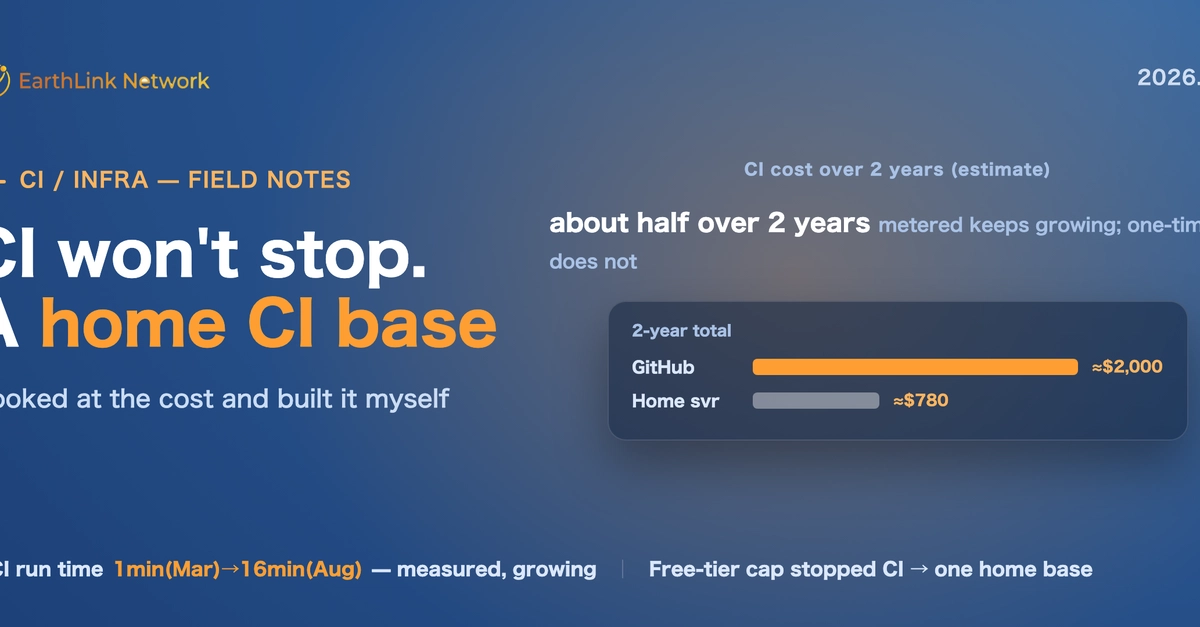
In late June 2026, the organization's GitHub Actions abruptly stopped functioning. Every pull request check failed within seconds, leaving an empty log. Plugin release notifications to Slack also ceased. The issue wasn't a code defect; an external service had halted the infrastructure due to billing issues. The developer was operating on GitHub Actions' free tier, but had exceeded its limits. This triggered metered charges, meaning any usage beyond the free minutes incurred costs. The 'free' tier effectively ended, and money began to flow out regardless of usage patterns. The core question became: continue paying GitHub on a per-usage basis, or build a self-hosted CI/CD base? GitHub's metered model means costs scale directly with test frequency and commit volume.
The author's organization faced a stark choice. Continuing with GitHub Actions meant a variable, potentially escalating monthly bill based on CI/CD usage. The alternative was to invest time and resources into building and maintaining an in-house solution, trading unpredictable operational costs for predictable, albeit upfront, capital expenditure and ongoing maintenance overhead. This decision hinges on the projected cost savings versus the engineering effort and the inherent complexity of managing a self-hosted CI/CD system. For small teams or individual developers, the tipping point where self-hosting becomes financially advantageous is a critical calculation.
Evaluating the Cost and Complexity Trade-off
The decision to build a home-grown CI/CD system stems from a direct confrontation with the costs associated with cloud-based, metered services. GitHub Actions, while convenient and tightly integrated, can become surprisingly expensive as usage scales. When the free tier is breached, each minute of compute time, each active workflow run, translates directly into a dollar amount. For a developer or a small team, this unpredictability can be a significant concern, especially when budgets are tight or development velocity demands frequent testing and integration.
Building a self-hosted solution, conversely, involves a different set of financial and operational considerations. There's an upfront investment in hardware, software licenses (if applicable), and crucially, engineering time. This time is spent setting up servers, configuring build agents, integrating with version control, managing dependencies, and implementing security measures. The ongoing costs shift from per-minute billing to hardware maintenance, power consumption, internet bandwidth, and the continuous effort required to keep the system updated, secure, and performing optimally. The key advantage is predictability: once the infrastructure is in place, the marginal cost of an additional build is significantly lower, and the total cost of ownership can be substantially less than a metered cloud service, particularly for consistent, high-volume usage.
Consider the analogy of a public utility versus a home generator. The utility (GitHub Actions) is convenient, reliable (usually), and you pay for exactly what you use. However, as your consumption increases, so does your bill, and you have little control over the underlying infrastructure or pricing changes. A home generator (self-hosted CI/CD) requires a large initial investment, regular maintenance, and troubleshooting. But once set up, you have more control over your power supply, and the cost per kilowatt-hour can be significantly lower, especially if you use a lot of power. The decision depends on your tolerance for upfront investment, your technical expertise, and your projected long-term consumption.

The Self-Hosted CI/CD Architecture
The author's approach involved setting up a dedicated CI/CD server at home. This typically entails a robust machine—often a repurposed workstation or a dedicated server—with sufficient processing power, RAM, and storage to handle concurrent build jobs. The core components of such a setup usually include:
- Version Control Integration: The system must connect to a Git repository (like GitHub, GitLab, or Bitbucket) to detect code changes and trigger builds. Webhooks are commonly used for this.
- Build Agents/Runners: These are the worker processes that execute the build, test, and deployment scripts. They can be installed on the same server or distributed across multiple machines for scalability and parallelization. For security and isolation, running these agents in containers (e.g., Docker) is a common practice.
- Orchestration Software: Tools like Jenkins, GitLab CI/CD (self-hosted), or Drone CI manage the workflow, schedule jobs, and report status. These platforms provide the interface for defining pipelines, managing configurations, and viewing build logs.
- Artifact Repository: A place to store build outputs (e.g., compiled binaries, Docker images). Solutions like Nexus, Artifactory, or even simple object storage can serve this purpose.
- Secrets Management: Securely storing sensitive information like API keys, passwords, and tokens is paramount. Tools like HashiCorp Vault or built-in secrets management features of orchestration software are essential.
The author's specific implementation likely focused on a lean setup, prioritizing essential functionality to replace the core CI/CD capabilities lost from GitHub Actions. This might involve leveraging open-source tools that are known for their flexibility and lower resource requirements. The goal is to replicate the automated testing and deployment workflows that are critical for maintaining development velocity and code quality, but without the per-minute billing.
Security Considerations in a Home-Built System
Building a CI/CD system at home introduces a unique set of security challenges that differ from managed cloud services. While GitHub Actions handles much of the underlying security infrastructure, a self-hosted solution places the onus squarely on the implementer. Key security considerations include:
- Network Security: The CI/CD server must be securely exposed to the internet if external triggers (like GitHub webhooks) are used. This often involves configuring firewalls, using VPNs, or employing reverse proxies with strong authentication and TLS/SSL encryption. Exposing build agents directly to the public internet is generally ill-advised.
- Access Control: Robust authentication and authorization mechanisms are critical. Only authorized users and systems should be able to trigger builds, access build artifacts, or modify pipeline configurations. Role-based access control (RBAC) is a standard practice.
- Secrets Management: As mentioned, securely handling API keys, credentials, and other sensitive data is non-negotiable. Hardcoding secrets in pipeline scripts or configuration files is a major security risk. Dedicated secrets management tools are highly recommended.
- Dependency Scanning: Automated tools should scan code dependencies for known vulnerabilities. Integrating these scans into the CI pipeline helps catch security issues early.
- Image Security: If containerized build agents or application images are used, they must be regularly scanned for vulnerabilities and kept up-to-date.
- System Hardening: The underlying operating system and all installed software on the CI/CD server must be kept patched and hardened against common attacks.
The author's decision to build at home implies a willingness to manage these security aspects directly. This requires a proactive security posture, continuous monitoring, and a deep understanding of the potential attack vectors. It's a trade-off: greater control and potential cost savings come with increased responsibility for security hygiene.
The Unanswered Question: Scalability and Reliability
While the author successfully replaced GitHub Actions with a self-hosted solution to manage costs, a significant question remains: how does this home-built system scale and what is its long-term reliability? Cloud-based CI/CD platforms are designed for massive scalability, automatically provisioning resources as demand increases. A self-hosted system, particularly one running on home hardware, has inherent physical limitations. Expanding capacity requires purchasing and installing more hardware, which is a manual process. Furthermore, relying on home internet connections and power can introduce points of failure not typically encountered with enterprise-grade cloud infrastructure. The author's solution might be cost-effective for their current workload, but what happens when the team grows, the number of projects increases, or peak build demands surge? Maintaining high availability and performance under varying loads is a considerable engineering challenge that cloud providers abstract away.