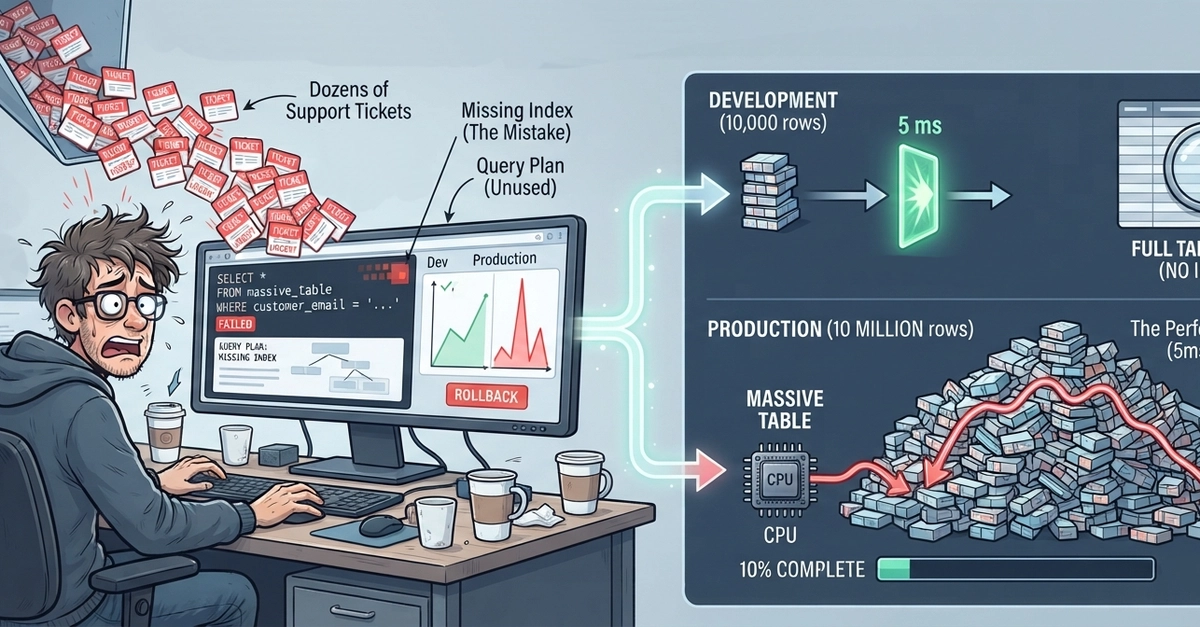
The Query That Worked Fine Until It Didn't
Every developer has a story about the query that worked perfectly in development and crawled to a halt in production. The table had 10,000 rows in your local database; in production it has 10 million. The query that took 5 milliseconds now takes 45 seconds. The dashboard times out. The support tickets arrive.
The culprit is almost always the same: a full table scan. The database engine reads every single row in the table, one by one, looking for the ones that match your WHERE clause. On a table with 10 million rows, that means reading millions of disk pages — work that could have been avoided with the right index.
An index is a separate data structure that the database maintains alongside your table. It’s like the index at the back of a book. Instead of reading the entire book page by page to find every mention of a specific topic, you look up the topic in the index, which gives you the exact page numbers. Database indexes work similarly, allowing the database to quickly locate specific rows without scanning the entire table.

How Indexes Work: B-Trees and Selectivity
The most common type of database index is a B-tree. A B-tree is a self-balancing tree data structure that keeps data sorted and allows searches, sequential access, insertion, and deletion in logarithmic time. Think of it less like a rigid file cabinet and more like a dynamic, perfectly organized library where every book (or row) is placed in its correct aisle and shelf based on its title (the indexed column value).
When you query a table using a column that has an index, the database traverses the B-tree. It starts at the root node and follows pointers down through intermediate nodes until it reaches a leaf node. Each leaf node contains the indexed values and pointers to the actual table rows that contain those values. This process is dramatically faster than scanning millions of rows.
However, not all indexes are equally effective. The usefulness of an index depends heavily on its selectivity. Selectivity refers to how unique the values in an indexed column are. A highly selective index has many unique values, meaning a query on that column will likely return only a small number of rows. For example, an index on a user ID column is highly selective because each ID is unique. An index on a boolean `is_active` column, which might only have `true` or `false` values, has very low selectivity. Querying `WHERE is_active = true` on a table where 99% of users are active will still require the database to scan a large portion of the table, even with an index.
Composite and Covering Indexes
When your queries involve multiple conditions in the WHERE clause, a composite index can be beneficial. A composite index is an index on two or more columns. The order of columns in a composite index matters significantly. An index on (last_name, first_name) can efficiently support queries filtering by `last_name` or by both `last_name` and `first_name`. However, it will be much less effective, or even useless, for queries filtering only by `first_name`.
The database uses the composite index by first looking at the `last_name` values. If a query only specifies `first_name`, the database cannot use the index effectively because it doesn't know which `last_name` to look for. It's like trying to find someone by their first name in a phone book sorted by last name first.
A covering index is a special type of index that includes all the columns needed to satisfy a query directly within the index itself. This means the database doesn't need to go back to the main table to fetch any additional data. For example, if you have an index on (user_id, email) and your query is SELECT email FROM users WHERE user_id = 123, the database can retrieve the `email` directly from the index without ever touching the main table rows. This can provide a significant performance boost.
Reading and Understanding EXPLAIN Plans
The most critical tool for diagnosing slow queries is the EXPLAIN (or EXPLAIN ANALYZE) command. This command tells you how the database plans to execute your query. It reveals which indexes will be used (or not used), the order of operations, and whether a full table scan is being performed.
A typical EXPLAIN output might show:
- Sequential Scan or Full Table Scan: This is usually bad news on large tables. It means the database is reading every row.
- Index Scan or Index Seek: This indicates the database is using an index. This is generally good.
- Bitmap Heap Scan: A more complex scan that uses an index to identify rows and then fetches them from the table. It can be efficient for queries that return a moderate number of rows.
- Cost Estimates: Databases provide estimated costs for different query plans. Lower costs are generally better.
- Rows Examined: This tells you how many rows the database thinks it needs to look at.
EXPLAIN ANALYZE goes a step further by actually executing the query and providing actual execution times and row counts, making it invaluable for pinpointing performance bottlenecks.
When Queries Don't Scale
Queries fail to scale for several reasons:
- Missing Indexes: The most common cause. Queries lack appropriate indexes for their
WHERE,JOIN, orORDER BYclauses. - Poorly Chosen Indexes: Indexes exist but are not selective enough, or their column order is incorrect for composite indexes.
- Unindexed Joins: Joining large tables without proper indexes on the join columns forces full table scans on one or both sides of the join.
- `SELECT *` in Production: Using `SELECT *` often prevents the use of covering indexes, forcing the database to fetch more data than necessary.
- Outdated Statistics: The database query planner relies on statistics about the data distribution in your tables. If these statistics are stale, the planner might choose an inefficient execution plan.
- Inefficient Query Logic: Sometimes, the query itself is structured poorly, leading to excessive computation or redundant operations.
To ensure your queries scale past millions of rows, focus on understanding your data, writing efficient WHERE clauses, and leveraging the power of B-tree indexes. Always test your queries with realistic data volumes and scrutinize their EXPLAIN plans. For developers building applications on any modern relational database, mastering indexing and query planning is not optional—it's a fundamental requirement for delivering performant applications.