The Preflight Problem
Developers frequently encounter Cross-Origin Resource Sharing (CORS) errors, leading to frustration and wasted debugging time. The common reflex is to scrutinize the client-side code, blaming the SDK, fetch calls, or even the browser itself. However, the root cause often lies not in the client's request formulation but in the server's response to the initial OPTIONS preflight request.
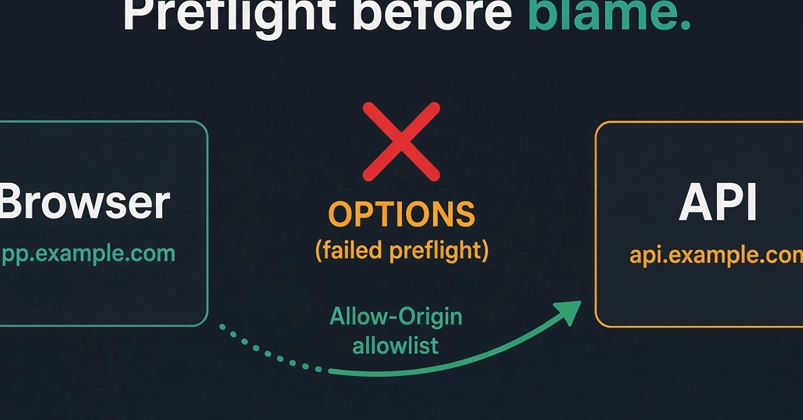
When a browser makes a cross-origin request that isn't a simple GET or POST (e.g., requests with custom headers, different HTTP methods, or when sending credentials), it first sends an OPTIONS request. This is known as a preflight request. The server's response to this preflight request must include specific CORS headers, such as Access-Control-Allow-Origin, Access-Control-Allow-Methods, and Access-Control-Allow-Headers. If the server fails to provide these headers correctly, or if they don't match the browser's expectations, the browser blocks the actual request before it even leaves the client. The client-side code, including the SDK, is never even reached for the main request, making it appear as if the SDK is broken when the issue is server-side configuration.
Common Misconceptions and Pitfalls
One of the most frequent misunderstandings involves the combination of Access-Control-Allow-Origin: * and credentials: 'include'. These two settings are fundamentally incompatible. The wildcard (*) for Access-Control-Allow-Origin signifies that any origin is permitted. However, when credentials: 'include' is set on the client-side (e.g., in `fetch` options or Axios configuration), the browser sends cookies, authorization headers, or TLS client certificates along with the request. For security reasons, the server must specify an exact origin in the Access-Control-Allow-Origin header when credentials are included. A wildcard is too broad and insecure in this context, leading the browser to block the request.
Another critical point is the precise matching of origins. If your Single Page Application (SPA) is hosted on https://app.example.com and your API is on https://api.example.com, the server's Access-Control-Allow-Origin header must explicitly list https://app.example.com. Using a wildcard here, even if it would technically allow the origin, can still cause issues, especially when credentials are involved. The server should be configured to echo back the exact origin it received in the Origin request header, provided that origin is present in an allowlist of trusted origins.
The preflight request itself uses the OPTIONS HTTP method. The server must be configured to handle these OPTIONS requests and return the appropriate CORS headers. Many server-side frameworks or API gateways might not automatically configure these headers for OPTIONS requests. Developers often forget to check if their server is correctly responding to OPTIONS requests with headers like:
Access-Control-Allow-Origin: The specific origin of the client application, or*if no credentials are used.Access-Control-Allow-Methods: A comma-separated list of HTTP methods allowed (e.g.,GET, POST, PUT, DELETE, OPTIONS).Access-Control-Allow-Headers: A comma-separated list of request headers allowed (e.g.,Content-Type, Authorization, X-Requested-With).Access-Control-Allow-Credentials: Set totrueif the request includes credentials.Access-Control-Max-Age: The maximum time in seconds that a preflight request can be cached.
If any of these headers are missing or incorrect in the OPTIONS response, the browser will block the subsequent actual request, even if the client-side code is perfectly valid. The error message displayed in the browser's developer console is usually the primary clue. Look for messages indicating that the OPTIONS request failed or that specific headers are missing from the preflight response.
Debugging Strategies
When faced with a CORS error, the first step should be to inspect the network tab in your browser's developer tools. Look for the OPTIONS request that precedes your actual failed request. Examine its response headers carefully.
- Check the
OPTIONSrequest status: Is it a 2xx success, or is it failing (e.g., 403 Forbidden, 404 Not Found, 500 Internal Server Error)? - Verify
Access-Control-Allow-Origin: Does it match your client's origin exactly, or is it*(if no credentials are used)? If credentials are used, it *must* be an exact origin. - Confirm
Access-Control-Allow-MethodsandAccess-Control-Allow-Headers: Do they include the HTTP method and custom headers your actual request is sending? - Check
Access-Control-Allow-Credentials: If your client is sending credentials (cookies, auth tokens), this header must betrueon the server's response.
If the OPTIONS request is failing or missing the necessary headers, the problem lies with your API's CORS configuration, not your client-side code. You will need to adjust the CORS middleware or configuration on your server. For example, in Node.js with Express, you might use the cors package and configure it like this:
const cors = require('cors');

const corsOptions = {
  origin: function (ctx, callback) {
    const allowedOrigins = ['https://app.example.com', 'https://api.example.com'];
    if (allowedOrigins.indexOf(ctx.header.origin) !== -1) {
      callback(null, true)
    } else {
      callback(new Error('Not allowed by CORS'))
    }
  },
  methods: 'GET,POST,PUT,DELETE,OPTIONS',
  allowedHeaders: 'Content-Type,Authorization',
  credentials: true,
  optionsSuccessStatus: 204 // Some legacy browsers (IE11, various SmartTVs) choke on 204
};

app.use(cors(corsOptions));
The key takeaway is that CORS preflight failures are server-side problems. Blaming the SDK or client-side logic is a premature step that often leads debugging down the wrong path. By understanding the role of the OPTIONS preflight request and meticulously checking the server's response headers, developers can efficiently pinpoint and resolve CORS issues.