Bridging the AI-Design Chasm
The promise of AI generating user interfaces is tantalizing, but the output often lands in a digital no-man's-land. Models can produce CSS or even interpret screenshots, but these outputs rarely translate directly into editable, native design elements within tools like Figma. This disconnect has been a significant bottleneck for integrating AI-driven design workflows. Elliot Silver's new initiative, Compact Design, directly addresses this gap with a focused, pragmatic approach.
The core idea behind Compact Design is simple yet powerful: create a small, well-defined JSON language that AI models can easily write, a schema can rigorously validate, and crucially, a Figma plugin can import to create native, editable frames. This isn't about asking a language model to directly manipulate Figma's plugin API, nor is it about hoping a generated screenshot can be reverse-engineered into a design. Instead, Compact Design establishes a common, structured intermediate format.
At the heart of this system is the @compact-design/core package. This library serves as the central validator, normalizer, linter, and patcher for Compact Design JSON. Its independence from Figma is a key design principle, ensuring that the core format and its validation logic are robust and not tied to the specifics of any single design tool. The Figma plugin is presented as the first 'adapter' or consumer of this format, demonstrating its practical application.
Understanding the Compact Design Schema
The structure of Compact Design is deliberately minimal, focusing on essential elements that can translate directly into design primitives. A foundational element is the canvas, which defines the top-level container for a design. This canvas has an ID, such as "desktop", and can contain various elements, including "layers", "styles", and "components".
Within the canvas, "layers" represent the visual elements arranged on the screen. Each layer has a unique ID, a type (e.g., "text", "rectangle", "frame"), and properties defining its appearance and position. For text layers, properties include "content", "fontSize", "fontFamily", "fontWeight", "lineHeight", "letterSpacing", "color", and "textAlign". For shape layers like rectangles, properties extend to "backgroundColor", "borderColor", "borderWidth", "borderRadius", and dimensions like "width", "height", "x", and "y".
Crucially, Compact Design supports "styles", allowing for the definition of reusable visual properties. This includes "colors", "typography" (font families, sizes, weights), and "effects" (like shadows). These defined styles can then be referenced by ID within layers, promoting consistency and reducing redundancy. For example, a text layer might use "fontFamily": "@style/font/inter" and "color": "@style/color/primary".
The concept of "components" further enhances reusability. Developers or AI models can define reusable UI elements, such as buttons or cards, with their own internal structure and properties. These components can then be instantiated within the canvas, similar to how components are used in Figma or other design systems.
The Role of Validation and Normalization
The @compact-design/core library plays a vital role in ensuring the integrity and usability of the Compact Design JSON. Its validation capabilities mean that any generated JSON can be checked against the defined schema, rejecting malformed or incomplete structures. This prevents the import of unusable data into Figma.
Normalization is another key function. AI models, especially large language models, can be inconsistent in their output. The core library can take variations in input JSON and transform them into a standardized format. This might involve ensuring all color values are in hex format, all spacing units are consistent, or that properties are ordered predictably. This standardization is essential for reliable parsing and rendering in Figma.
Linting and patching are also part of the core's responsibilities. Linting can identify potential issues or deviations from best practices within the Compact Design JSON, even if it's technically valid. Patching could involve making minor automatic corrections to resolve common inconsistencies or to ensure compatibility with the Figma plugin's rendering logic. This process ensures that the JSON is not just valid, but also optimized for its intended use case.
Figma Integration: The First Adapter
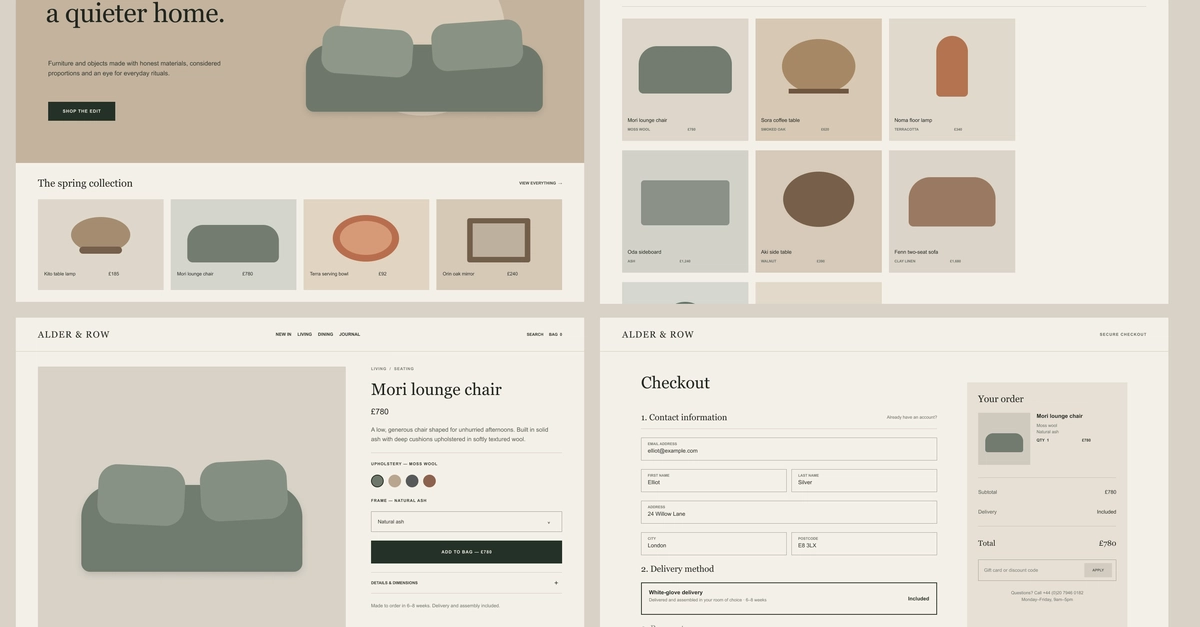
The Figma plugin is the tangible proof of concept for Compact Design. It demonstrates how the standardized JSON can be ingested and transformed into native Figma elements. When a user imports a Compact Design JSON file through the plugin, the plugin parses the JSON, interprets the layers, styles, and components, and then uses Figma's API to create corresponding frames, text layers, shapes, and styles within the Figma canvas.
The goal is for the imported elements to be fully editable. This means that once imported, a designer can select a text layer and change the content, modify colors, adjust sizes, and reposition elements just as they would with any other Figma object. This level of interactivity is what makes Compact Design a practical tool rather than just a static data format.
The decoupling of the core validation logic from the Figma adapter is critical. It means that the Compact Design format can potentially be adapted for other design tools or environments in the future. A Sketch plugin, an Adobe XD adapter, or even a web component library could theoretically be built to consume the same Compact Design JSON, provided they can map its structures to their native elements.
Implications and Future Directions
Compact Design represents a thoughtful step towards making AI-generated UIs more practical. By focusing on a structured, validated JSON format and providing a clear path to integration with popular design tools, it lowers the barrier for designers and developers looking to experiment with AI in their workflows. It moves beyond abstract generation to concrete, usable output.
What remains to be seen is how widely this format will be adopted by AI model developers and design tool ecosystems. The success of Compact Design will depend on its ability to become a de facto standard for AI-to-design interchange. If AI models begin to natively output Compact Design JSON, and if other design tools build their own importers, it could significantly streamline the process of translating AI-generated concepts into production-ready designs.
For now, Compact Design offers a clear, actionable solution for those working with Figma, providing a much-needed bridge between the generative capabilities of AI and the precision of professional design software.