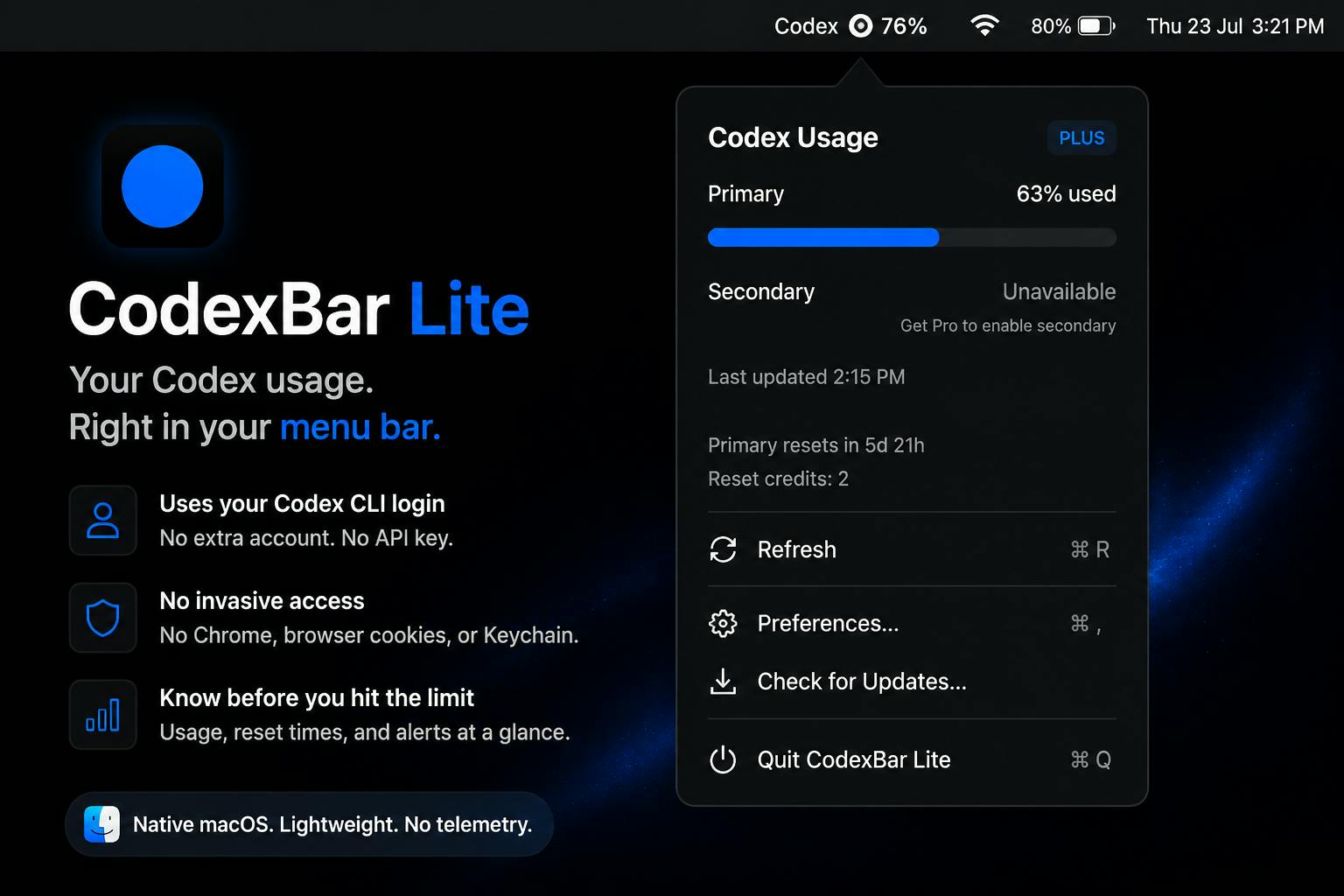
Introducing CodexBar Lite: A Privacy-Focused App Tracker
CodexBar Lite emerges as a new entrant in the macOS utility space, focusing on providing users with a clear view of their application usage directly from their menu bar. Unlike many productivity or tracking tools, CodexBar Lite explicitly champions a privacy-first approach. This means all data processing and storage happens locally on the user's machine, eliminating the need for cloud synchronization or data transmission to external servers. This design choice is crucial for users who are increasingly wary of how their digital footprints are managed.
The application aims to offer a lightweight and unobtrusive way to monitor which applications are consuming your time. For developers, founders, and creators, understanding where time is spent is fundamental to optimizing workflows and identifying productivity bottlenecks. CodexBar Lite provides this insight without compromising user confidentiality, a significant differentiator in a market often characterized by data-hungry services.
Core Functionality and User Experience
CodexBar Lite's primary function is to display the currently active application in the macOS menu bar. This offers an immediate, at-a-glance understanding of what you are interacting with. The app is designed to be minimal, ensuring it doesn't add unnecessary clutter to the user's interface. Its unobtrusive nature means it can run in the background, diligently tracking application switches and active times without demanding constant attention.
The privacy-first ethos is not just a marketing angle; it's embedded in the app's architecture. Data related to application usage is stored locally. This eliminates potential privacy risks associated with cloud-based tracking services, such as data breaches, unauthorized access, or the selling of user data to third parties. For professionals who handle sensitive information or simply value their digital privacy, this local-first approach is a compelling reason to consider CodexBar Lite.
While the current iteration, CodexBar Lite, focuses on the core functionality of menu bar tracking, the name suggests a potential for more advanced features in future versions. However, for users seeking a straightforward, privacy-respecting tool to gain basic insights into their app usage, CodexBar Lite delivers on its promise.
Why Privacy Matters in App Tracking
In an era where digital surveillance and data collection are pervasive, tools that track user activity, even for productivity purposes, can raise concerns. Many existing time-tracking applications rely on sending usage data to company servers for analysis, aggregation, or even targeted advertising. This model creates a trust deficit. Users are asked to trade their data for the perceived benefit of insights.
CodexBar Lite sidesteps this issue entirely. By keeping all data on the user's Mac, it offers a level of transparency and control rarely found in this category. This approach is particularly relevant for professionals working with confidential projects or companies that have strict data governance policies. The absence of cloud dependencies also means the app is not reliant on external servers, potentially offering greater reliability and faster performance for its core function.
The decision to build a privacy-centric tool reflects a growing trend. Users are becoming more educated about their digital rights and are actively seeking out products that align with their values. CodexBar Lite taps into this demand, positioning itself as a solution for those who want to understand their digital habits without surrendering their personal information.
Potential Use Cases and Target Audience
CodexBar Lite is primarily aimed at individuals who want to improve their focus and productivity. This includes:
- Developers: To understand time spent on coding IDEs, documentation, communication tools, and research.
- Founders: To track time across business development, strategic planning, team management, and market research activities.
- Creators: To monitor usage of design software, content creation tools, editing suites, and social media platforms.
- Students: To track time spent on study applications, research, and potential distractions.
- Anyone concerned about digital privacy and seeking a simple way to monitor their screen time without uploading data.
The simplicity of the application means it requires minimal setup. Once installed, it begins tracking immediately, presenting useful data without a steep learning curve. This makes it accessible to a broad range of users, from tech-savvy professionals to those less familiar with complex software.
Future Outlook and Market Position
CodexBar Lite enters a competitive market of productivity and time-tracking applications. However, its explicit focus on privacy carves out a distinct niche. While many tools offer extensive features like detailed reporting, project management integration, or team collaboration, CodexBar Lite opts for a more focused, minimalist, and secure experience. This deliberate choice targets a specific segment of the market that prioritizes data security and local processing above all else.
The success of CodexBar Lite will likely depend on its ability to maintain its core privacy promise while potentially offering just enough utility to satisfy its target audience. As users become more aware of the implications of data privacy, tools like CodexBar Lite may find a receptive market. The question remains whether this privacy-first approach can be scaled to accommodate more complex tracking needs without compromising its fundamental principles.