The Dependency Dilemma: A Constant Backlog
Every software project faces the silent dread of dependency upgrades. It’s not that upgrading is technically difficult, but the real question—"Will this break our production system?"—often yields a frustratingly uncertain answer. Changelogs describe what the library authors changed, but they rarely reveal the impact on your specific codebase. This gap leaves developers hesitant, creating a growing backlog of crucial updates that never get addressed.
Ahmad Malik, a software engineer, experienced this friction firsthand. He observed that the default approach to assessing upgrade risk involved a leap of faith: update the version, run the build, and hope for the best. This trial-and-error method is inefficient and introduces unnecessary risk. To combat this, Malik developed bumpscan, a command-line interface (CLI) tool designed to provide concrete answers before an upgrade occurs.
How bumpscan Scans for Trouble
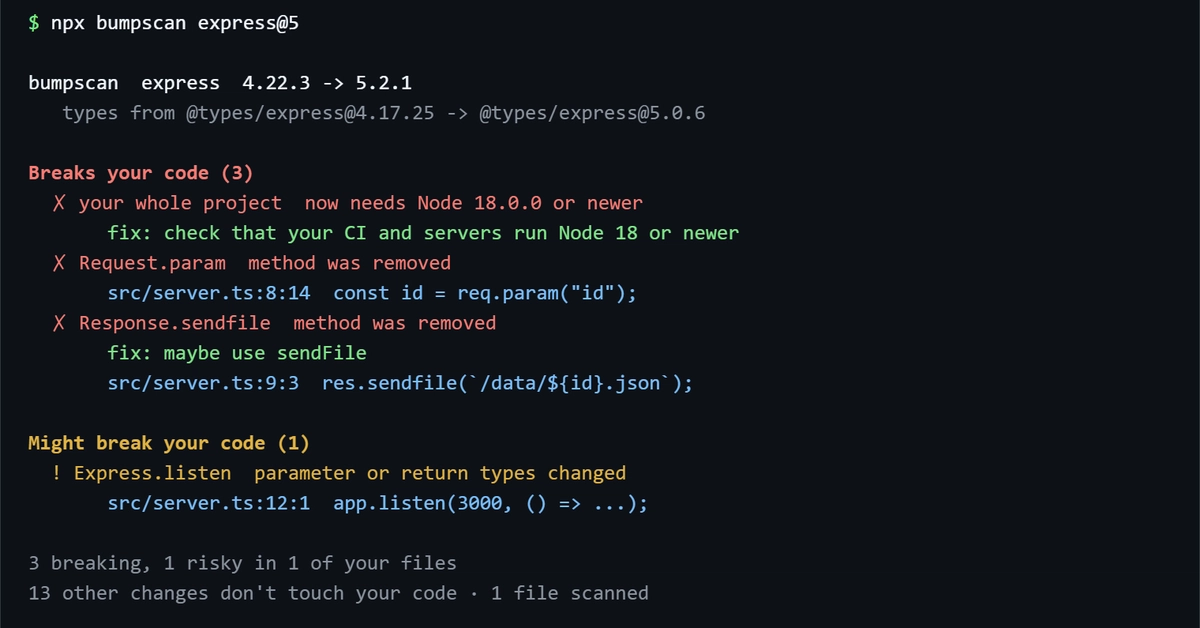
bumpscan operates by analyzing the potential impact of an npm package upgrade on your project's code. When you run a command like npx bumpscan express@5, the tool doesn't just look at the new version of Express. It intelligently identifies related dependencies, such as type definitions (e.g., @types/express), and compares the current versions in your package.json with the target versions specified in the command.
The core of bumpscan’s utility lies in its ability to detect specific types of breaking changes. It goes beyond simple version number checks. For instance, if upgrading Express to version 5 requires a newer Node.js runtime (like Node 18.0.0 or newer), bumpscan flags this requirement. This is crucial because Node.js version compatibility is a common source of unexpected breakages, especially in CI/CD pipelines or on production servers that might not be running the latest LTS releases.
The tool performs a static analysis of your codebase, looking for patterns that might be rendered incompatible by the proposed dependency update. While the specifics of its analysis engine are proprietary, the output clearly indicates which lines or aspects of your project are affected and why. This allows developers to preemptively address issues, such as updating their Node.js runtime environment or refactoring code that relies on deprecated features of the upgraded package.
Interpreting bumpscan's Output
The output from bumpscan is designed to be clear and actionable. It presents a summary of the upgrade, including the current and target versions of the primary package and its associated types. The critical information is presented under clear headings:
- Breaks your code (X): This section lists the identified breaking changes. Each point is marked with a clear indicator (e.g.,
❌). - 💡 fix: For each breaking change, bumpscan offers a suggestion or a clear instruction on how to resolve the issue. This might involve checking environment configurations, updating other parts of the codebase, or ensuring specific prerequisites are met.
In the example provided, bumpscan highlights that upgrading Express to version 5 necessitates Node.js 18.0.0 or newer. It then provides a direct suggestion: "check that your CI and servers run Node 18 or newer." This level of specificity transforms the upgrade process from a risky guessing game into a manageable task. Developers can now assess the cost of an upgrade (e.g., updating server environments) before committing to it, making informed decisions about when and how to proceed.
Beyond Basic Checks: What bumpscan Understands
What sets bumpscan apart is its understanding that dependency upgrades are rarely isolated events. A change in a major package often ripples through its ecosystem. This includes:
- Peer Dependencies: While not explicitly detailed in the provided example, a robust tool like bumpscan would likely analyze peer dependency requirements. If a new version of a library requires a different version of a package that your project also uses directly, this can create conflicts.
- API Changes and Deprecations: bumpscan aims to identify code patterns that rely on APIs that have been removed or significantly altered in the new version. This is the most direct way an upgrade can break application logic.
- Runtime Requirements: As demonstrated, changes in minimum required runtimes (like Node.js versions) are critical and often overlooked until deployment.
The tool's ability to pinpoint these issues before they manifest in a broken build or, worse, a production incident, provides significant value. It shifts the burden of discovery from the developer running tests to the CLI tool performing static analysis. This is particularly valuable for projects with extensive dependency trees or those that are slow to build, where the cost of a failed upgrade attempt is high.
The Future of Dependency Management
bumpscan represents a pragmatic step forward in managing the inherent complexities of modern software development. By providing developers with actionable insights into the potential consequences of npm upgrades, it directly addresses a persistent pain point. The ability to anticipate and mitigate breaking changes before they occur can save countless hours of debugging and reduce the risk associated with maintaining up-to-date dependencies.
As software projects grow and evolve, the challenge of keeping dependencies current will only intensify. Tools like bumpscan offer a glimpse into a future where dependency management is less about reactive firefighting and more about proactive, informed decision-making. The quiet backlog of unaddressed upgrades may soon become a relic of the past, replaced by confident, efficient maintenance workflows.