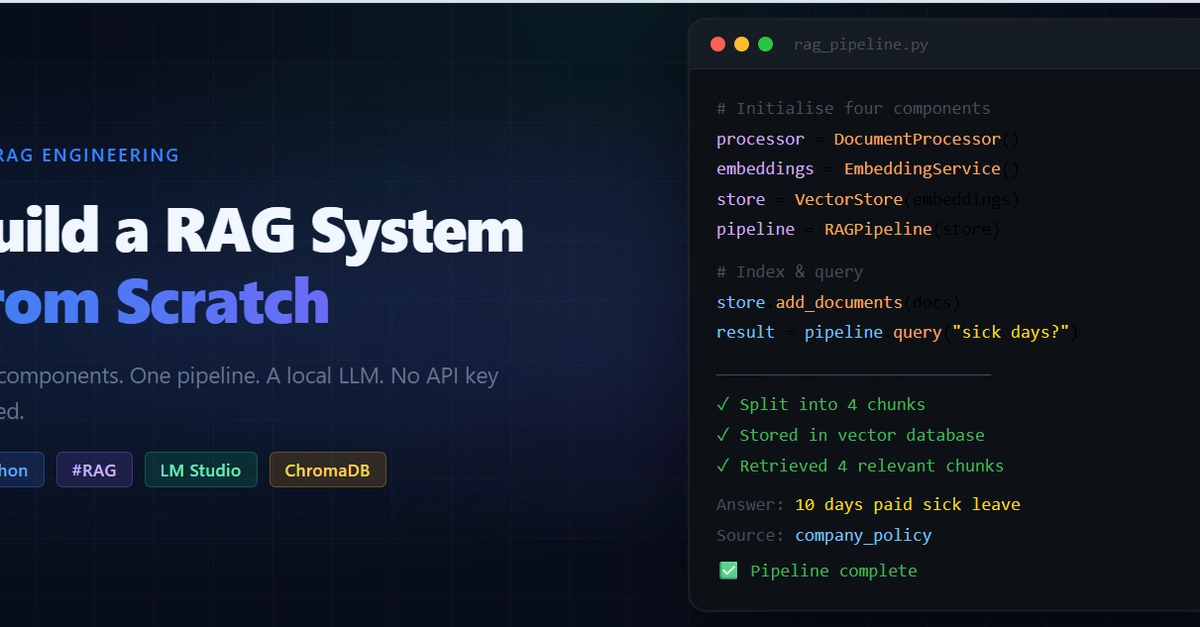
The Business Case for Local RAG
Companies sitting on vast internal knowledge bases often face a common challenge: how to make that information accessible and actionable for employees. Imagine a large enterprise with hundreds of pages of HR policies, legal documents, or product manuals. When an employee has a specific question, sifting through dense documentation is time-consuming and inefficient. This is where Retrieval-Augmented Generation (RAG) systems shine. A well-implemented RAG pipeline can answer user queries accurately and instantaneously, drawing directly from the company's proprietary data. This not only boosts productivity but also ensures consistency in information delivery. The traditional approach often involves expensive cloud-based LLM APIs and complex infrastructure. However, a growing trend is emerging: building these powerful systems entirely from scratch, leveraging local resources to control costs and enhance data privacy.
Deconstructing the RAG Pipeline: Four Essential Components
Building a RAG system from the ground up involves orchestrating several key pieces. This article outlines a practical, code-driven approach focusing on four core components that form a complete, working pipeline. We will eschew cloud dependencies and expensive API keys, opting instead for a local setup that is both cost-effective and provides greater control over data. The chosen stack includes Python as the programming language, LangChain for workflow orchestration, ChromaDB for vector storage, and a local Large Language Model (LLM) served via LM Studio. For embedding, we'll use nomic-embed-text, and the LLM itself will be Qwen 9B, also running locally. This setup is ideal for developers, startups, or any organization prioritizing data sovereignty and cost management.
Before diving into the code, ensure you have the necessary tools installed. The core libraries can be installed via pip:
pip install langchain langchain-community langchain-chroma langchain-openai langchain-text-splitters langchain-core openai requests
Crucially, LM Studio must be running with the Qwen 9B model loaded and accessible before you attempt to run the Python scripts. LM Studio provides a user-friendly interface to download and serve LLMs locally.
Component 1: The Document Processor
The first step in any RAG system is handling the raw data. The Document Processor's primary role is to ingest unstructured text documents and prepare them for the subsequent stages. This involves two main sub-tasks: loading the documents and splitting them into manageable chunks. The quality of this splitting process is paramount, as it directly impacts the relevance of retrieved information.
LangChain offers various document loaders for different file types (PDF, TXT, HTML, etc.). For this example, we assume plain text files. The critical aspect here is chunking. Raw documents are often too large to be fed directly into an LLM or an embedding model. We need to break them down into smaller, semantically coherent pieces. The chunk size and overlap are hyperparameters that require careful tuning. A smaller chunk size might provide more granular detail but could lose broader context. A larger chunk size might retain context but could include irrelevant information. Overlap ensures that context is not lost at the boundaries between chunks.
For instance, using RecursiveCharacterTextSplitter from langchain_text_splitters allows us to split documents based on a list of characters (e.g., `
`, `
`, ` `) and a specified chunk size. An overlap of, say, 100 characters helps maintain continuity between adjacent chunks.

Component 2: The Embedding Engine
Once documents are split into chunks, each chunk needs to be converted into a numerical representation that a machine can understand and compare. This is the role of the Embedding Engine. Embedding models transform text into high-dimensional vectors, where semantically similar pieces of text are located close to each other in the vector space.
For a local RAG system, we need an embedding model that can run offline. nomic-embed-text is a suitable choice, offering good performance without requiring an internet connection. The process involves iterating through each text chunk generated by the Document Processor and passing it to the embedding model. The output is a vector for each chunk.
The choice of embedding model significantly influences the RAG system's performance. Factors like the dimensionality of the vectors, the training data of the model, and its ability to capture nuances in the domain-specific language are important. For HR documentation, an embedding model trained on a diverse corpus, including technical and policy-related text, would be beneficial.
Component 3: The Vector Store
The Embedding Engine produces vectors, but we need an efficient way to store and query these vectors. This is where the Vector Store comes in. A vector store is a database optimized for storing and searching high-dimensional vectors. It allows for rapid similarity searches, finding vectors (and thus text chunks) that are most similar to a given query vector.
ChromaDB is an excellent open-source, embeddable vector database that works well for local deployments. It's lightweight and integrates seamlessly with LangChain. After generating embeddings for all document chunks, we add these embeddings, along with the original text chunks and any associated metadata, to the ChromaDB instance. This collection of indexed vectors forms the knowledge base that the RAG system will query.
When a user asks a question, their query is first converted into an embedding vector using the same embedding model. ChromaDB then performs a similarity search to find the top-k most relevant document chunks from the knowledge base. Think of ChromaDB less like a traditional relational database and more like a highly organized librarian who can instantly retrieve books (document chunks) based on the precise topic (embedding vector) you describe.
Component 4: The Retriever and Generator
This is where the magic happens – combining retrieved information with the LLM to generate an answer. The Retriever component uses the Vector Store to fetch the most relevant document chunks based on the user's query embedding. This is typically done by taking the top-k results from the similarity search.
The Generator component, powered by a local LLM (Qwen 9B via LM Studio in our case), receives the user's original question *and* the retrieved document chunks. LangChain's RetrievalQA chain is a common pattern for this. It constructs a prompt that includes both the question and the context from the retrieved documents, instructing the LLM to answer the question based *only* on the provided context. This is the