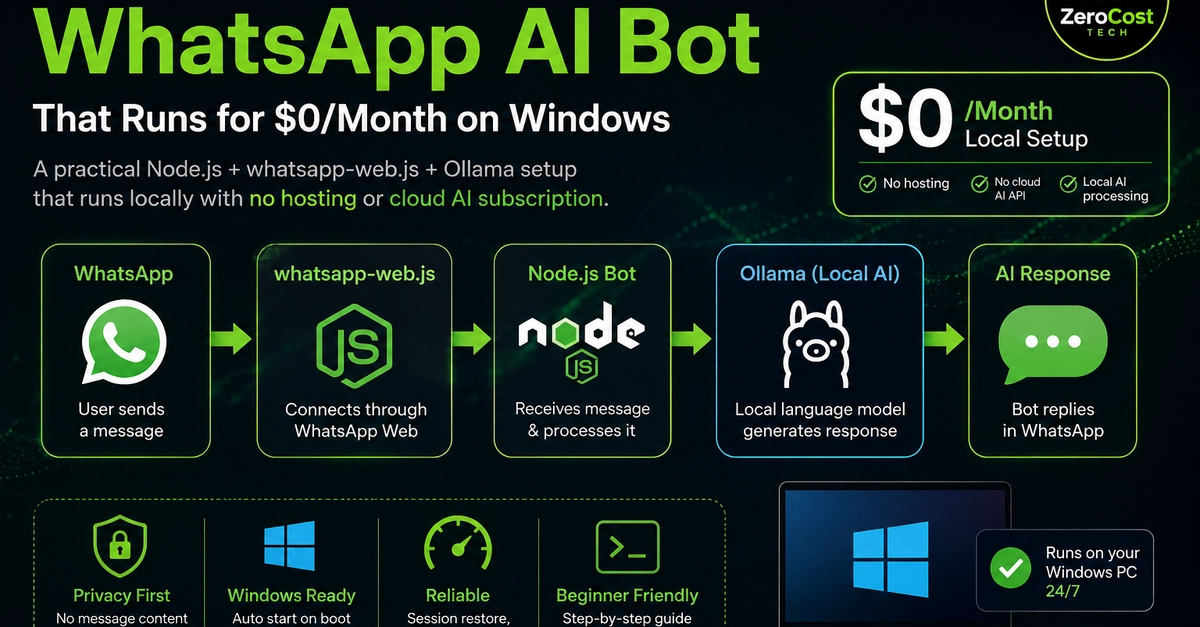
The $0/Month WhatsApp AI Bot: Architecture and Implementation
The drive to create a functional WhatsApp AI bot without incurring recurring monthly costs for cloud hosting or AI APIs led to an innovative solution: leveraging an existing, always-on Windows PC. This approach bypasses the need for Virtual Private Servers (VPS) or paid third-party AI services, offering a compelling alternative for developers and hobbyists. The core components of this setup include WhatsApp integration via Node.js and optional local AI processing using Ollama, all running on Windows 10 or 11. Crucially, the "$0/month" designation excludes the cost of the PC, internet, and electricity, focusing solely on additional software, hosting, and API expenses.
The fundamental architecture is designed for simplicity: incoming WhatsApp messages are received by a Node.js bot, which then processes them. For AI-powered responses, the bot can forward the user's message to a locally installed Ollama model. The AI's generated response is then sent back through the bot to the user on WhatsApp.
WhatsApp Integration with Node.js
The first hurdle is establishing reliable communication with WhatsApp. This is achieved using a Node.js application that interfaces with the WhatsApp Business API or, more commonly for personal projects, through unofficial libraries that mimic client behavior. The author opted for a method that involves using a phone with WhatsApp Web connected to the server. This setup requires a Windows machine that is consistently powered on and connected to the internet. The Node.js script acts as the central hub, listening for incoming messages. When a message arrives, the script parses it and determines the appropriate action. This could be a simple predefined reply, or a more complex interaction involving an AI model.
The key to this integration is a library that can manage the WhatsApp Web session. Libraries like `whatsapp-web.js` are designed for this purpose, allowing developers to authenticate, send messages, receive events, and manage contacts programmatically. The setup involves scanning a QR code with a primary WhatsApp account, similar to how one logs into WhatsApp Web on a browser. Once authenticated, the Node.js script can receive message events in real-time. This event-driven architecture is crucial for a responsive bot, ensuring that replies are sent promptly after messages are received.
Local AI with Ollama
The intelligence behind the bot is provided by a local AI model. Ollama is a popular choice for running large language models (LLMs) on personal hardware. It simplifies the process of downloading, installing, and running various open-source LLMs, such as Llama 3, Mistral, and Gemma, directly on a Windows machine. The advantage of using Ollama is that it abstracts away much of the complexity associated with model deployment and inference. Once Ollama is installed, developers can pull and run models with simple commands.
The Node.js bot integrates with Ollama by making API calls to the Ollama server, which runs locally. The bot sends the user's message as a prompt to the chosen LLM. The LLM processes the prompt and generates a response, which Ollama then returns to the bot. This response can be anything from a direct answer to a complex narrative, depending on the model's capabilities and the prompt's specificity. The speed of the AI response is largely dependent on the hardware of the Windows PC, particularly the CPU and RAM, and the size of the LLM being used.
For developers looking to fine-tune the AI's behavior, Ollama supports various model parameters that can be adjusted. These include temperature (controlling randomness), top-p (nucleus sampling), and maximum tokens (response length). By experimenting with these parameters, one can tailor the AI's output to be more creative, factual, or concise, as needed. The ability to run these models locally means that sensitive data never leaves the user's machine, offering a privacy advantage over cloud-based AI services.
Automated Restart and Reliability
A significant challenge for any application running on a personal computer is ensuring its continuous operation. For a WhatsApp bot, downtime means missed messages and a degraded user experience. To address this, the setup incorporates an automatic restart mechanism. This can be achieved through Windows Task Scheduler or third-party tools like NSSM (Non-Sucking Service Manager). NSSM is particularly useful as it can run a Node.js application as a Windows service, allowing it to start automatically on system boot and restart automatically if it crashes.
Configuring the Node.js script as a service with NSSM involves specifying the path to the Node.js executable and the path to the bot's main script. NSSM then manages the application's lifecycle. This ensures that even after a power outage or a system reboot, the bot will resume its operation without manual intervention. This reliability is crucial for maintaining a consistent connection to WhatsApp and ensuring the bot is always available to process messages. The author emphasizes that while the core bot and AI are free, the underlying PC and internet connection are prerequisites for this $0/month model.
Cost Savings and Considerations
The primary appeal of this project is the elimination of recurring software and hosting fees. Traditional solutions often involve paying for services like Twilio for WhatsApp API access, cloud hosting for the bot's backend, and AI API calls to services like OpenAI or Google AI. By contrast, this method leverages existing hardware and free software. Ollama provides free access to powerful open-source LLMs, and Node.js is an open-source runtime. The WhatsApp integration, while relying on WhatsApp Web, sidesteps direct API fees.
However, there are trade-offs. The performance is limited by the capabilities of the host PC. Running large LLMs can be resource-intensive, requiring a decent CPU and sufficient RAM. If the PC is also used for other demanding tasks, the bot's responsiveness might suffer. Furthermore, the reliance on WhatsApp Web means that any changes to WhatsApp's web interface or terms of service could potentially break the integration. While this approach offers significant cost savings, users must weigh these against potential performance limitations and the inherent fragility of unofficial integrations.
The question remains whether this approach is sustainable for businesses or if it's primarily a solution for individual developers and hobbyists. The scalability and robustness required for commercial applications might necessitate a shift back to official APIs and cloud infrastructure, despite the associated costs.