The Traditional File Conversion Bottleneck
Most file conversion workflows follow a predictable, often cumbersome, path. Users select a file from their device, upload it to a third-party server, wait for the conversion process to complete, download the new file, and finally, hope their data was handled securely and privately. This model, while convenient for simple tasks, introduces several drawbacks: it requires an internet connection, introduces latency due to upload and download times, necessitates trust in the third-party server's security and privacy practices, and often requires user accounts or limits usage.
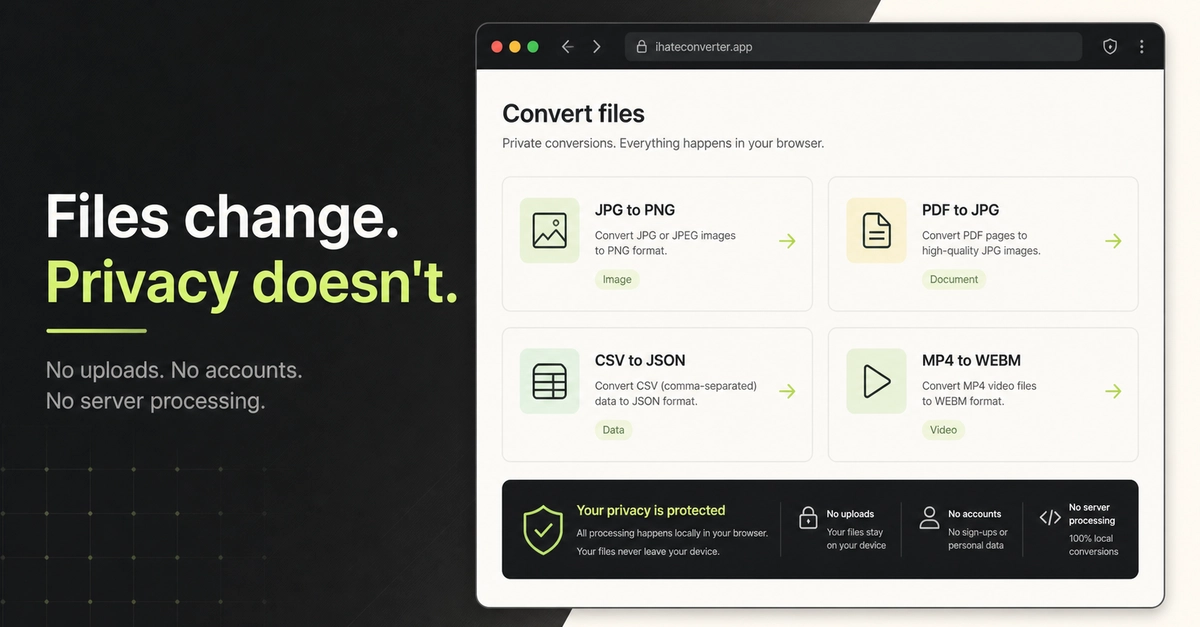
For many common file format transformations, this multi-step, server-dependent process is no longer the only viable option. Modern web browsers, with their increasingly sophisticated JavaScript engines and APIs, are capable of reading, manipulating, and exporting files directly on the user's local machine. This shift enables a new class of tools that bypass the traditional upload-and-download cycle entirely. The result is a fundamentally different user experience: no upload queues, no account requirements, and critically, no server-side processing of user data.
Understanding "No Upload" Conversion
When we talk about "no upload" file conversion, we mean that the entire conversion process – from reading the source file to generating the output file – happens within the user's browser. This is achieved through client-side scripting, primarily JavaScript, leveraging browser APIs to access local files and perform transformations. This approach offers significant advantages:
- Speed: Eliminating the upload and download steps drastically reduces conversion times, especially for large files.
- Privacy: Since files never leave the user's device, sensitive data remains private and is not exposed to external servers. This is a critical differentiator for users dealing with confidential documents, personal information, or proprietary designs.
- Accessibility: These tools work offline once the necessary scripts are loaded, making them usable in environments with limited or no internet connectivity.
- Simplicity: The workflow is streamlined. Users select a file, choose the desired output format, and the converted file is immediately available for download or further local use. No account creation or login is necessary.
The underlying technology often involves libraries that can parse various file formats in JavaScript. For example, converting a Word document to PDF might involve a JavaScript library that can interpret the DOCX format and then render it as a PDF. Similarly, image format conversions (like PNG to JPG) can be handled by the browser's native Canvas API or specialized JavaScript image manipulation libraries.
Where Browser-Based Conversion Shines
This client-side approach is particularly well-suited for a range of tasks:
- Document Conversions: Converting between common document formats like DOCX, ODT, PDF, and Markdown.
- Image Manipulations: Resizing, cropping, and changing formats (e.g., JPG, PNG, WebP) of images.
- Audio/Video Transcoding: While more computationally intensive, some basic audio and video format conversions are feasible directly in the browser.
- Data Format Conversions: Transforming data between formats like CSV, JSON, and XML.
- Developer Tools: Converting configuration files, code snippets, or log files.
Tools like “I Hate Converter” exemplify this approach, offering a suite of locally executed converters designed for speed and privacy. They provide a clear alternative for users who are wary of uploading sensitive files to online services.
Limitations and Considerations
Despite its advantages, browser-based file conversion is not a universal solution. Several factors limit its applicability:
- Computational Intensity: Complex conversions or operations on very large files can strain the user's device resources (CPU and RAM). This can lead to slow performance or even browser crashes. Think of it like trying to edit a 4K video on a smartphone – it might be possible, but it will likely be a frustrating experience.
- File Size Limits: Browsers have inherent memory limitations. Extremely large files (e.g., multi-gigabyte video files) may exceed these limits, making client-side processing infeasible.
- Format Support: The range of file formats that can be reliably parsed and converted using JavaScript libraries is still limited compared to the vast array of proprietary and complex formats available. Niche or highly specialized formats may not have readily available client-side parsers.
- Browser Compatibility: While modern browsers are powerful, reliance on specific APIs or advanced JavaScript features can sometimes lead to compatibility issues across different browsers or older versions.
- Complexity of Transformations: Some conversion tasks involve intricate logic or require access to external resources (like fonts for document rendering) that are difficult or impossible to replicate purely client-side.
For tasks that exceed these limitations, a server-side approach remains necessary. However, for the vast majority of everyday file conversion needs, the client-side method offers a compelling, faster, and more private alternative.
The Future of Local File Processing
The trend towards client-side processing in web applications is accelerating. As browsers become more capable and JavaScript performance continues to improve, we can expect to see an expansion of what's possible directly within the browser. This includes more sophisticated document editing, image and video processing, and even complex data analysis tasks that previously required dedicated desktop applications or server infrastructure.
For developers, this opens up new possibilities for building highly responsive, privacy-focused applications. By leveraging client-side technologies, they can create tools that offer a superior user experience while building greater trust through transparency and local data handling. The question for developers building conversion tools is no longer *if* they can do it client-side, but *which* formats and *which* transformations are best suited for this increasingly powerful local execution environment.