Preventing Unwanted Mac Sleep for Developers
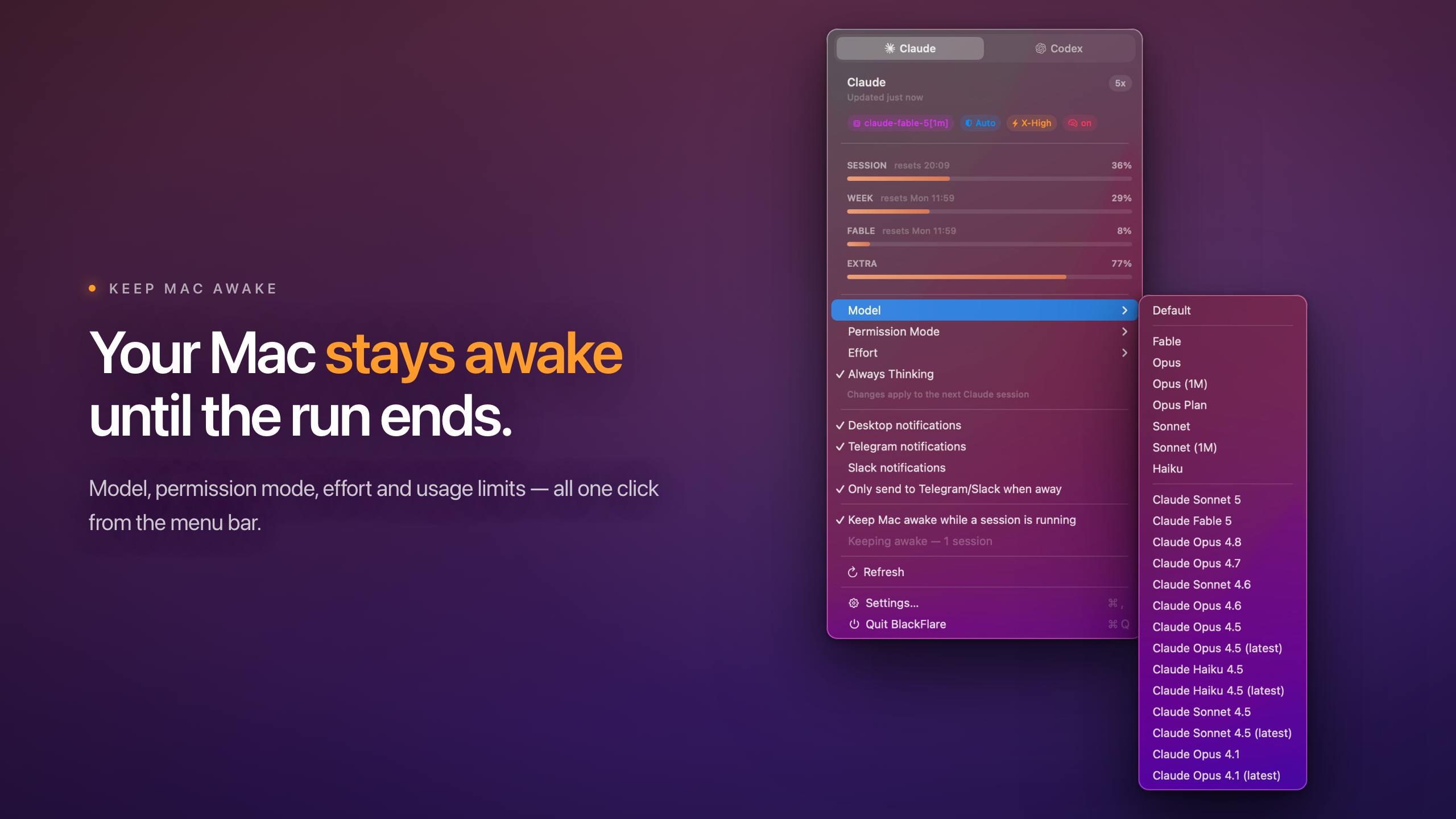
The seemingly simple act of a laptop going to sleep can derail complex, time-consuming development tasks. For developers working with local AI models, code compilation, or other resource-intensive processes, an unexpected sleep event can mean lost progress and hours of wasted computation. BlackFlare, a new utility for macOS, directly addresses this by keeping the Mac awake during critical operations.
Unlike system-level settings that offer a binary choice between immediate sleep and never sleeping, BlackFlare provides a more nuanced approach. It allows users to specify when their machine should remain active, targeting specific scenarios rather than forcing a constant state of wakefulness. This is particularly relevant for developers leveraging powerful local AI models like those from OpenAI's Codex or Anthropic's Claude, which can take hours to train or fine-tune.
The core functionality of BlackFlare is to prevent the Mac from entering its automatic sleep mode. This is achieved by simulating activity that the operating system interprets as the machine being in active use. Users can activate BlackFlare before initiating a long-running process, ensuring their Mac stays awake until they manually disable the utility or the process concludes. This simple yet effective measure saves developers from the frustration of interrupted workflows and the need to restart lengthy tasks.
Intelligent Notifications for AI Model Completion
Beyond simply keeping the Mac awake, BlackFlare introduces a crucial notification layer designed for asynchronous tasks. Developers often initiate processes that run in the background, and they need to be informed precisely when these tasks are complete. BlackFlare integrates with popular AI development tools and services, specifically mentioning Claude and Codex, to monitor their completion status.
When a developer initiates a task with these tools – for instance, training a machine learning model or generating a large batch of code suggestions – BlackFlare can be configured to listen for the task's completion signal. Upon receiving this signal, it triggers a user-defined alert. This could be a visual notification on the Mac, an audible chime, or even a more advanced integration like a push notification to a mobile device, though the current iteration focuses on on-device alerts.
This notification feature transforms BlackFlare from a simple 'keep-awake' utility into a more intelligent workflow assistant. It allows developers to step away from their machines, knowing they will be promptly informed when their work is ready. This is akin to setting a precise timer for a complex baking recipe; you don't need to constantly watch the oven, but you need to know the exact moment it's done. For AI development, where model training can take an entire workday or longer, this 'set it and forget it' capability is invaluable. It frees up developers to attend meetings, work on other projects, or simply take a break without the anxiety of missing a critical completion event.
Bridging the Gap in Developer Tooling
The emergence of tools like BlackFlare highlights a growing need for specialized utilities that address the friction points in modern development workflows. As AI models become more complex and require more significant computational resources, the underlying infrastructure – including the developer's own machine – needs to adapt. Simple operating system settings are often too blunt, and dedicated developer environments can be overkill for managing these specific needs.
BlackFlare occupies a niche by focusing on two fundamental aspects: system availability and timely task completion alerts. Its appeal lies in its simplicity and directness. It doesn't attempt to be a full-fledged IDE or a complex project manager. Instead, it offers a focused solution to common annoyances. The integration with specific AI tools like Claude and Codex suggests a thoughtful approach to targeting the needs of developers working with cutting-edge AI technologies.
The success of such a utility hinges on its reliability and ease of use. Developers are notoriously intolerant of tools that add complexity or instability. BlackFlare’s promise of keeping the Mac awake and providing accurate notifications without demanding extensive configuration or introducing performance issues will be key to its adoption. If it delivers on this promise, it could become an indispensable part of the toolkit for anyone regularly working with long-running AI processes on their Mac.