The Unseen Cost of AWS Connectivity
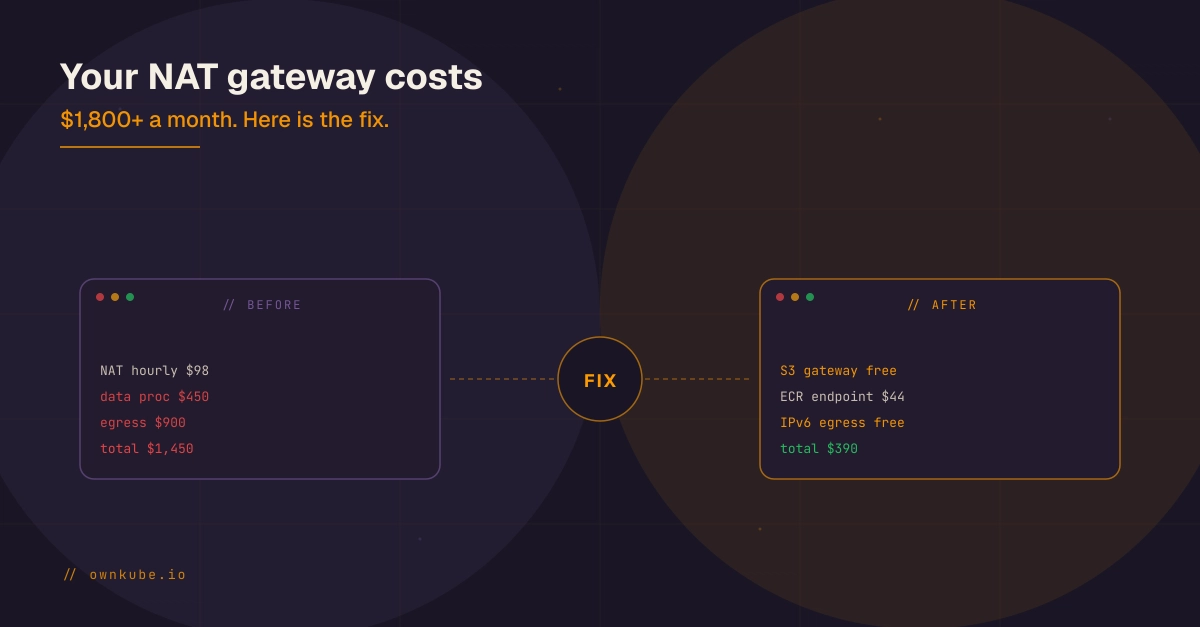
Startups launching production workloads on AWS often face a surprising bill. Beyond EC2 instances, a significant charge lurks in "EC2 Other" or "VPC" line items: the NAT gateway. For typical production workloads interacting with services like S3, RDS, and third-party APIs, NAT gateway costs in 2026 can range from $400 to over $1,800 per month. This often dwarfs the actual compute costs.
The core of the problem lies in how AWS charges for NAT gateways. As of April 2026 in us-east-1, the pricing is $0.045 per hour per Availability Zone (AZ) plus $0.045 per GB of data processed. The hourly fee alone amounts to roughly $32 per gateway per month. However, the data-processing fee is the real culprit, scaling directly with the volume of egress traffic. Many organizations are surprised to discover that a substantial portion of this data processing fee is for traffic that never actually needed to leave their Virtual Private Cloud (VPC) in the first place.
Understanding NAT Gateway Traffic
A NAT gateway allows instances in private subnets to connect to the internet or other AWS services while preventing inbound connections initiated from the internet. This is crucial for security and network management. However, when instances in a private subnet need to access AWS services that are publicly accessible (like S3, DynamoDB, or even public APIs), the traffic is routed through the NAT gateway. For each GB of data that flows through this gateway, you incur a charge. This becomes particularly expensive when dealing with large data transfers or frequent, small requests to AWS services.
The common misconception is that all outbound traffic from a private subnet must traverse the NAT gateway. While true for general internet access, AWS provides more efficient and cost-effective mechanisms for accessing its own services. The surprise for many is that a significant portion of their NAT gateway bill is for data that could have been routed directly, bypassing the NAT gateway entirely.
Pattern 1: Leveraging VPC Endpoints
The most impactful strategy to reduce NAT gateway costs is the strategic use of VPC endpoints. VPC endpoints allow resources within your VPC to connect privately to supported AWS services without requiring a NAT gateway, internet gateway, or VPN. Traffic between your VPC and these services stays within the AWS network. This not only eliminates the per-GB data processing fees for these services but also offers improved security and potentially lower latency.
AWS offers two types of VPC endpoints:
- Interface Endpoints (powered by AWS PrivateLink): These create an elastic network interface (ENI) in your subnet that serves as an entry point for traffic to the specified AWS service. They are ideal for services that require a public IP address for access, such as many third-party APIs or services that do not support Gateway Endpoints. Interface endpoints themselves incur hourly charges and per-GB data processing fees, but these are typically far lower than NAT gateway egress fees for the same traffic.
- Gateway Endpoints: These are available for a limited set of AWS services, most notably Amazon S3 and DynamoDB. When you create a Gateway Endpoint, you associate it with a route table in your VPC. Traffic destined for the service is then routed directly to the endpoint, bypassing the NAT gateway. Gateway Endpoints are free of charge, making them the most cost-effective option where available.
To implement this, you need to identify which AWS services your applications are frequently accessing. Common candidates for VPC endpoints include S3 (for storing logs, backups, or data artifacts), DynamoDB (for NoSQL data), and services like ECR (Elastic Container Registry) or SageMaker. By configuring Gateway Endpoints for S3 and DynamoDB and Interface Endpoints for other services, you can redirect a significant portion of traffic away from the NAT gateway.
The critical step is to update your VPC route tables. For Gateway Endpoints, you add a specific route for the service's prefix list to the endpoint. For Interface Endpoints, you typically use private DNS resolution, ensuring that requests to the service's default endpoint resolve to the private IP addresses of the endpoint ENI.
Pattern 2: Embracing IPv6
For outbound traffic that genuinely needs to reach the public internet (e.g., third-party APIs not supported by VPC endpoints), IPv6 offers a more cost-effective solution than NAT gateways. AWS now supports IPv6 for VPCs and EC2 instances. If your instances are assigned an IPv6 address, they can initiate outbound connections to the internet directly without needing a NAT gateway. This bypasses the NAT gateway's data processing fees entirely for IPv6 traffic.
Implementing IPv6 involves several steps:
- Enable IPv6 on your VPC: Assign an IPv6 CIDR block to your VPC.
- Assign IPv6 addresses to subnets: Allocate an IPv6 CIDR block to your subnets.
- Assign IPv6 addresses to instances: Instances launched in these subnets can receive an IPv6 address.
- Configure route tables: Ensure your route tables have a route for IPv6 traffic to the internet (typically via an Internet Gateway).
- Update security groups and NACLs: Allow necessary IPv6 traffic.
This approach is particularly beneficial for applications that frequently interact with external services or download external dependencies. By enabling IPv6, you can significantly reduce the data volume processed by your NAT gateway, thereby lowering your monthly bill. It's important to note that while IPv6 eliminates NAT gateway fees for IPv6 traffic, it does not replace the NAT gateway for IPv4-only outbound connectivity. You might need a hybrid approach, using IPv6 for internet-bound traffic where possible and NAT gateways for essential IPv4 egress.
Pattern 3: NAT Instance as an Alternative
For workloads that absolutely require NAT for IPv4 egress and cannot leverage VPC endpoints or IPv6, a self-managed NAT instance can sometimes be more cost-effective than a NAT gateway. A NAT instance is simply an EC2 instance configured to perform Network Address Translation. You can deploy a small EC2 instance (e.g., a t3.micro or t3.small) in a public subnet and configure its routing and firewall rules to act as a NAT device for your private subnets.
The cost of a NAT instance is primarily the hourly cost of the EC2 instance itself, plus the cost of data transfer out of AWS. For moderate to high traffic volumes, this can be significantly cheaper than the NAT gateway's data processing fees. For instance, a t3.micro instance costs approximately $0.0104 per hour, which is around $7.50 per month. Even with moderate data transfer, this can be substantially less than the $32+ hourly fee plus data charges of a NAT gateway.
However, using a NAT instance introduces operational overhead. You are responsible for managing the instance, including patching, security, high availability, and scaling. AWS NAT Gateways are managed services, offering high availability across multiple AZs by default. If you opt for a NAT instance, you must architect for redundancy, typically by deploying at least two NAT instances across different AZs and using Elastic IPs and route table configurations to ensure failover. This adds complexity but can yield significant cost savings for specific use cases.
The Takeaway for Your AWS Bill
The high cost of AWS NAT gateways is rarely an inherent flaw in the service but rather a consequence of misaligned traffic routing. By understanding where your data is going and implementing strategies like VPC endpoints for AWS services and IPv6 for general internet access, you can drastically reduce or even eliminate these unexpected charges. For remaining IPv4 egress needs, a self-managed NAT instance presents a viable, albeit more complex, alternative. Regularly auditing your VPC traffic patterns and identifying opportunities to route traffic directly or more efficiently is key to controlling your AWS spend.