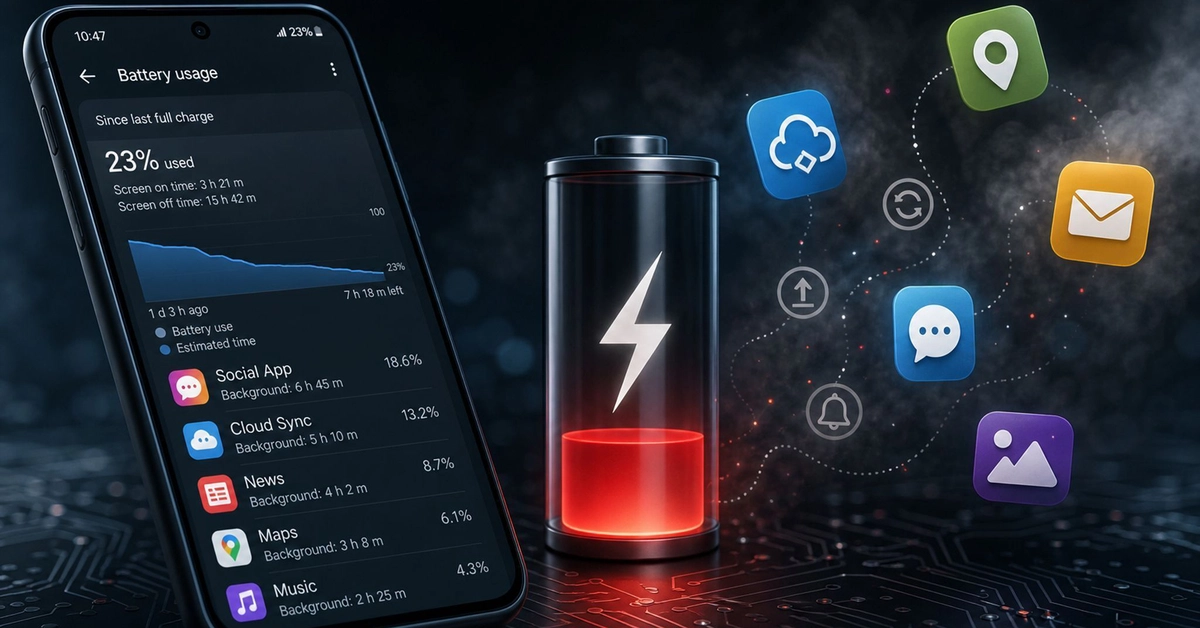
The Illusion of "Closed": What Apps Do When You're Not Looking
It’s a common frustration: your phone’s battery is plummeting, and the culprit isn't the app you're actively using, but one that’s supposedly closed. This disconnect between user perception and actual app behavior is at the heart of Android’s background battery drain problem. When an app is "not open," it doesn't mean it's inactive. It simply implies that no visible activity is on screen. The underlying processes, however, can remain very much alive, performing a variety of tasks that collectively consume power.
These hidden activities range from routine operations like syncing data in the background, to scheduled alarms that wake the device, to foreground services that continuously track location for navigation or fitness apps. Push notifications can trigger network requests, and in less optimized scenarios, poorly managed coroutines or background threads might repeatedly poll servers for updates. The challenge for users is that Android’s battery usage screen often lumps these diverse activities together, making it difficult to pinpoint the exact cause of the drain. What appears as a single entry might mask a constellation of power-hungry operations.
Legitimate vs. Malicious Background Work
Not all background activity is detrimental. Certain apps require continuous operation to function as intended. A navigation app, for instance, must access location data to provide real-time directions. A podcast player needs to download episodes without interruption. Messaging applications must remain connected to receive incoming messages instantly. These are examples of legitimate background work, essential for delivering a seamless user experience.
The problem escalates when background work becomes excessive, inefficient, or unnecessary. This can manifest in several ways:
- Frequency: An app checking for updates or syncing data far more often than required. For example, a news app polling a server every minute for minor content changes.
- Duration: Background processes that run for extended periods, even when the task could be completed much faster or batched with other operations.
- Inefficiency: Tasks that are not optimized for battery consumption. This could involve poorly written code that keeps the CPU active longer than needed, or frequent, unbatched network requests that repeatedly wake the device and radio.
- Misplaced Priorities: Developers might use background services for tasks that could be handled more efficiently by Android's job scheduling system, which is designed to optimize resource usage.
The Technical Underpinnings: Services, Alarms, and WorkManager
Android provides several mechanisms for apps to perform work in the background, each with its own implications for battery life. Understanding these is key to diagnosing drain issues.
Foreground Services
Foreground services are designed for tasks that the user is actively aware of and expects to continue even when not directly interacting with the app. Examples include playing music, tracking a run, or navigating. These services require a persistent notification, signaling to the user that the app is performing a significant operation. While essential for user-facing background tasks, overuse or misuse of foreground services—especially for non-critical functions—can lead to substantial battery drain because they have higher priority and are less likely to be killed by the system.
Background Services
Historically, background services were a common way to perform tasks like data syncing or network operations. However, Android has progressively restricted their capabilities to conserve battery. Starting with Android 8.0 (Oreo), apps can't run background services unless they are in the foreground or the app has been recently used. If an app needs to perform deferred or long-running operations, it should use more modern APIs.
Alarms
Alarms are used to schedule tasks at specific times or intervals. While useful for time-sensitive operations, a large number of alarms, especially those set to wake the device frequently, can lead to rapid battery depletion. The system has to wake up the CPU and radio for each alarm, consuming power. Developers should consider using inexact alarms where precision isn't critical and batching alarms when possible.
WorkManager
WorkManager is Android's recommended solution for deferrable, guaranteed background work. It intelligently manages tasks, considering device state (like battery level, network connectivity) and system optimizations. WorkManager can execute tasks even if the app or device restarts. It's designed to be battery-efficient, abstracting away the complexities of background execution and allowing developers to specify constraints (e.g., run only on Wi-Fi). Improper use of WorkManager, such as setting frequent, unconstrained work requests, can still lead to battery drain, but it is generally the most battery-aware option available.
Coroutines and Threads
Modern Android development heavily utilizes Kotlin Coroutines and Java Threads for asynchronous operations. While coroutines offer efficient ways to manage background tasks, poorly implemented loops or long-running threads that aren't properly managed can keep the CPU active, consuming significant power. Developers must ensure that background threads are released when no longer needed and that coroutine scopes are managed correctly to prevent leaks and unnecessary processing.
The Developer's Dilemma and User Impact
The root cause often lies in developer choices. A quick fix implemented months ago—like a frequent polling loop—might be forgotten, continuing to drain batteries long after its initial necessity has passed. Developers might not be fully aware of the cumulative impact of their background operations, especially on older devices or under specific network conditions.
Furthermore, the Android ecosystem is vast, with countless apps vying for limited device resources. When multiple apps engage in inefficient background activity, the combined effect can severely impact the overall battery life of a device. This is compounded by the fact that users often have dozens of apps installed, many of which are rarely opened but still perform background tasks.
For users, the primary recourse is to monitor battery usage through the device settings, identify the top offenders, and then take action. This might involve restricting background data usage for specific apps, disabling background activity entirely, or uninstalling apps that are consistently problematic. However, this reactive approach doesn't solve the underlying issue of inefficient app development.
Looking Ahead: System Optimizations and Developer Responsibility
Google continuously works to improve Android's battery management system, introducing features like App Standby, Doze mode, and background execution limits to curb excessive power consumption. Yet, these system-level optimizations can only go so far. The ultimate responsibility lies with developers to write efficient, battery-aware code. This means understanding the implications of background tasks, leveraging modern APIs like WorkManager, and rigorously testing apps for battery impact under various real-world conditions.
The tension between providing rich, responsive app experiences and conserving battery life is ongoing. As apps become more sophisticated, so too must the development practices that underpin them. For users, a vigilant approach to managing app permissions and monitoring battery usage remains crucial in maximizing device uptime.