The Chaos of 3D Model Folders
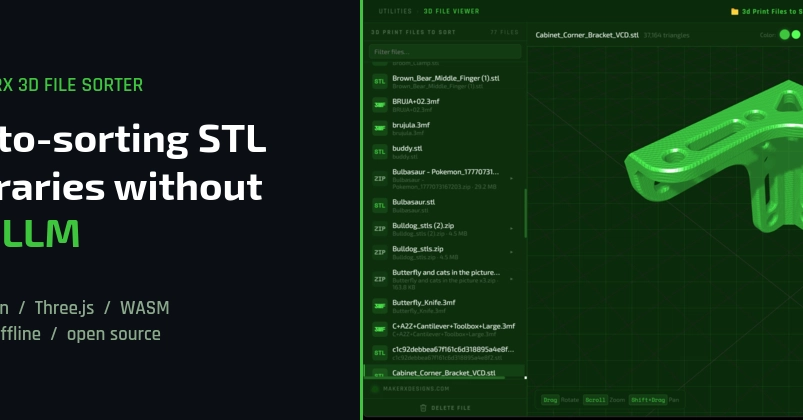
If you've spent any significant time in 3D printing, you know the feeling. Files pile up: STLs, 3MFs, STEPs, OBJs, PLYs, often zipped and buried under nonsensical names. Finding a specific model can devolve into a frustrating game of opening six different files, hoping one is the right one. This is the problem MakerX aims to solve with its new 3D File Sorter.
The core issue is scale. As a hobbyist or a professional, the sheer volume of generated or downloaded models quickly overwhelms manual organization. Without a system, the digital workspace becomes as cluttered as a physical workshop floor.
Local Processing Over Cloud AI
In today's AI-driven landscape, the immediate thought for automatic categorization is often a Large Language Model (LLM). However, the MakerX 3D File Sorter takes a deliberately different path, eschewing cloud-based AI for a local, JavaScript-based classifier. This decision is rooted in practical considerations that resonate deeply with developers and power users.
Cloud APIs introduce several friction points. First, there's the per-user cost associated with API calls, which can escalate quickly for a widely used tool. Second, network latency adds an unavoidable delay to operations. Most critically, a cloud dependency means the tool ceases to function when offline – a significant drawback for users who might be working on a plane, in a remote location, or simply with an unreliable internet connection.
Instead, the MakerX 3D File Sorter's classification engine is built from a few hundred lines of straightforward JavaScript. This approach ensures that the tool runs entirely locally, offering immediate performance and complete user privacy without external dependencies or ongoing costs. The entire classification logic is contained and executed on the user's machine.
Under the Hood: Electron, Three.js, and OCC
The application leverages Electron 28 to create a cross-platform desktop shell, packaged for Windows using NSIS and electron-builder. This allows for a native-like application experience across different operating systems, while keeping the core logic in web technologies.
For model previewing, the sorter integrates Three.js, a powerful and popular JavaScript 3D library. This enables users to visualize models directly within the application before they are filed, providing a crucial verification step. The ability to see a 3D representation without needing to open a separate slicer or CAD program significantly speeds up the organization process.
While the source doesn't explicitly detail the geometry kernel used for complex model analysis beyond previews, the mention of 'occ' suggests a potential integration with Open Cascade Technology or a similar robust CAD kernel. This would be essential for any deeper analysis of model geometry, such as determining printability, complexity, or specific features, which could inform more sophisticated sorting rules beyond simple file extensions.
How It Works: Preview and Sort
The workflow is designed for simplicity and efficiency. The user points the sorter to a folder containing their 3D models. The application then scans this folder, presenting a preview of each detected model. This preview functionality, powered by Three.js, is a key differentiator. Users can quickly flip through their collection, seeing what each file actually contains.
Once a model is previewed, or even before, the sorter's internal JavaScript classifier gets to work. It analyzes the file type and potentially other metadata or geometric characteristics. Based on these analyses, it automatically moves the file into predefined category folders. This could include categories like 'Printers', 'Materials', 'Projects', 'Prototypes', or 'Functional Parts', depending on how the user configures or how the sorter intelligently infers the model's purpose.
The entire process runs locally. There are no server calls, no API keys to manage, and no data leaving the user's machine. This makes the tool not only cost-effective but also highly secure and reliable, especially for individuals dealing with proprietary designs or sensitive project files.
The Case for Local Tools
The decision to build a local-first tool in an era dominated by cloud services is a deliberate statement. It highlights a growing segment of the user base that values privacy, offline capability, and cost predictability. For developers, it means a simpler deployment model and fewer external dependencies to manage. For users, it means a tool that works consistently and doesn't require a subscription or worry about data privacy policies.
The open-source nature of the code on GitHub further reinforces this philosophy. Developers can inspect the logic, understand exactly how their files are being categorized, and even contribute improvements. This transparency builds trust and allows the community to adapt the tool to their specific needs. It’s a refreshing approach that prioritizes user control and technical simplicity over the more complex, often opaque, cloud-based solutions.
Future Implications
While the current implementation focuses on file sorting and previewing, the local-first, JavaScript-based architecture opens doors for future expansion. Imagine integrating more advanced local analysis tools, custom scripting interfaces, or even local machine learning models if the need arises, all without external service reliance. The MakerX 3D File Sorter demonstrates that powerful automation doesn't always require a trip to the cloud.